
Git
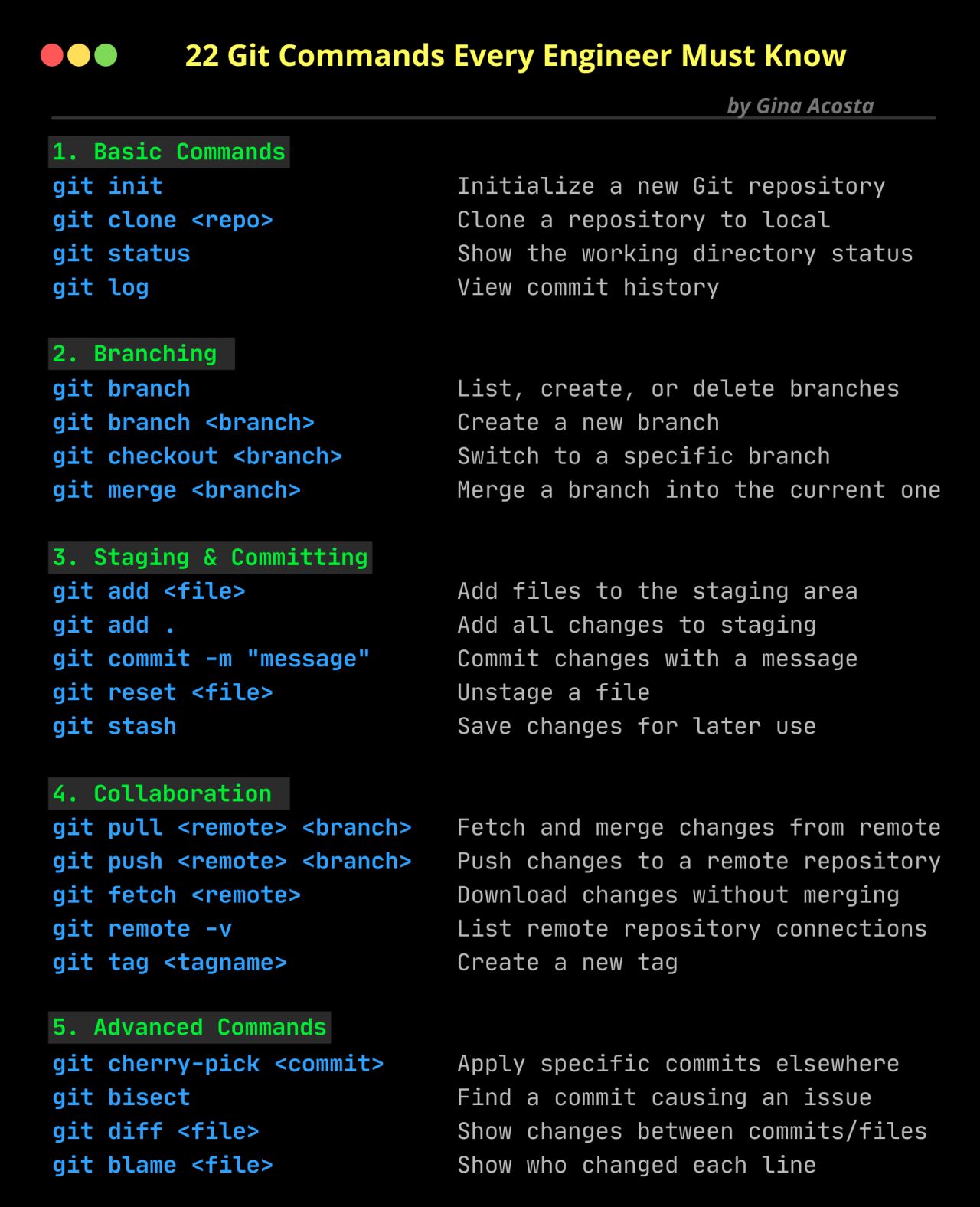
- Git commands
- 𝐑𝐞𝐩𝐨𝐬𝐢𝐭𝐨𝐫𝐲 𝐁𝐚𝐬𝐢𝐜𝐬:
- Clone a Repository:
Command:
git clone <repository_url>
- Initialize a Repository:
Command:
git init
2. 𝐖𝐨𝐫𝐤𝐢𝐧𝐠 𝐰𝐢𝐭𝐡 𝐁𝐫𝐚𝐧𝐜𝐡𝐞𝐬:
- Create a New Branch:
Command:
git branch <branch_name>
- Switch to a Branch:
Command:
git checkout <branch_name>
- Create and Switch to a New Branch:
Command:
git checkout -b <new_branch_name>
- List Branches:
Command:
git branch
3. 𝐂𝐨𝐦𝐦𝐢𝐭𝐭𝐢𝐧𝐠 𝐂𝐡𝐚𝐧𝐠𝐞𝐬:
- Stage Changes:
Command:
git add <file_name>
- Stage All Changes:
Command:
git add .
- Commit Changes:
Command:
git commit -m "Commit message"
4. 𝐏𝐮𝐥𝐥𝐢𝐧𝐠 𝐚𝐧𝐝 𝐏𝐮𝐬𝐡𝐢𝐧𝐠:
- Pull Changes from Remote:
Command:
git pull origin <branch_name>
- Push Changes to Remote:
Command:
git push origin <branch_name>
5. 𝐌𝐞𝐫𝐠𝐢𝐧𝐠 𝐂𝐡𝐚𝐧𝐠𝐞𝐬:
- Merge Branch into Current Branch:
Command:
git merge <branch_name>
6. 𝐖𝐨𝐫𝐤𝐢𝐧𝐠 𝐰𝐢𝐭𝐡 𝐑𝐞𝐦𝐨𝐭𝐞𝐬:
- Add a Remote Repository:
Command:
git remote add <remote_name> <repository_url>
- List Remote Repositories:
Command:
git remote -v
7. 𝐇𝐚𝐧𝐝𝐥𝐢𝐧𝐠 𝐂𝐨𝐧𝐟𝐥𝐢𝐜𝐭𝐬:
- Check for Conflicts:
Command:
git diff
- Resolve Conflicts and Continue Merge:
Command:
git add <file_name>
git merge --continue
8. 𝐆𝐢𝐭𝐇𝐮𝐛 𝐀𝐜𝐭𝐢𝐨𝐧𝐬:
- Workflow Syntax Checking:
Command:
git pull origin <branch_name>
git push origin <branch_name>
9. 𝐌𝐢𝐬𝐜𝐞𝐥𝐥𝐚𝐧𝐞𝐨𝐮𝐬:
- Check Git Status:
Command:
git status
- View Commit History:
Command:
git log
- Ignore Files (Add to `.gitignore`):
Command:
echo "<file_name>" >> .gitignore
𝓒𝓸𝓶𝓶𝓾𝓷𝓲𝓽𝔂 𝓯𝓸𝓻 𝓹𝓻𝓸𝓯𝓮𝓼𝓼𝓲𝓸𝓷𝓪𝓵𝓼 : https://www.thealpha.dev/

1.Core:
• git init
• git clone
• git add
• git commit
• git status
• git diff
• git checkout
• git reset
• git log
• git show
• git tag
• git push
• git pull
2.Branching:
• git branch
• git checkout -b
• git merge
• git rebase
• git branch --set-upstream-to
• git branch --unset-upstream
• git cherry-pick
3.Merging:
• git merge
• git rebase
4.Stashing:
• git stash
• git stash pop
• git stash list
• git stash apply
• git stash drop
5.Remotes:
• git remote
• git remote add
• git remote remove
• git fetch
• git pull
• git push
• git clone --mirror
6.Configuration:
• git config
• git global config
• git reset config
7. Plumbing:
• git cat-file
• git checkout-index
• git commit-tree
• git diff-tree
• git for-each-ref
• git hash-object
• git ls-files
• git ls-remote
• git merge-tree
• git read-tree
• git rev-parse
• git show-branch
• git show-ref
• git symbolic-ref
• git tag --list
• git update-ref
8.Porcelain:
• git blame
• git bisect
• git checkout
• git commit
• git diff
• git fetch
• git grep
• git log
• git merge
• git push
• git rebase
• git reset
• git show
• git tag
9.Alias:
• git config --global alias.<alias> <command>
10.Hook:
• git config --local core.hooksPath <path>
11.Experimental: (May not be fully Supported)
• git annex
• git am
• git cherry-pick --upstream
• git describe
• git format-patch
• git fsck
• git gc
• git help
• git log --merges
• git log --oneline
• git log --pretty=
• git log --short-commit
• git log --stat
• git log --topo-order
• git merge-ours
• git merge-recursive
• git merge-subtree
• git mergetool
• git mktag
• git mv
• git patch-id
• git p4
• git prune
• git pull --rebase
• git push --mirror
• git push --tags
• git reflog
• git replace
• git reset --hard
• git reset --mixed
• git revert
• git rm
• git show-branch
• git show-ref
• git show-ref --heads
• git show-ref --tags
• git stash save
• git subtree
• git tag --delete
• git tag --force
• git tag --sign
• git tag -f
• git tag -l
• git tag --verify
• git unpack-file
• git update-index
• git verify-pack
• git worktree
------------------- END ------------------
Some good resources to Learn Git faster ☺️
1.Git Official Documentation:
https://git-scm.com/doc
2.GitHub Learning Lab:
https://rb.gy/ksc45f
3.Codecademy Course
https://lnkd.in/g-87iUdn
4. Pro Git: by Scott Chacon [Book]
https://lnkd.in/gecriC8P
5. YouTube
• FreeCodeCampOrg- beginer
https://rb.gy/ljxt5s
• FreeCodeCampOrg- Intermediate
https://rb.gy/1x6mc
• Programming with mosh
https://rb.gy/vfkom
No comments to display
No comments to display