# Technical Overview
Networks, AI, Linux, HTML, Load Balancing, Databases, Search Engines
# Networking Protocols
[](https://resources.planforfailure.com/uploads/images/gallery/2025-10/IV04Wx3cdduW788O-network-routing.jpeg)
[](https://resources.planforfailure.com/uploads/images/gallery/2024-04/fjAAM47ggVTAHXJK-7osi.jpeg)
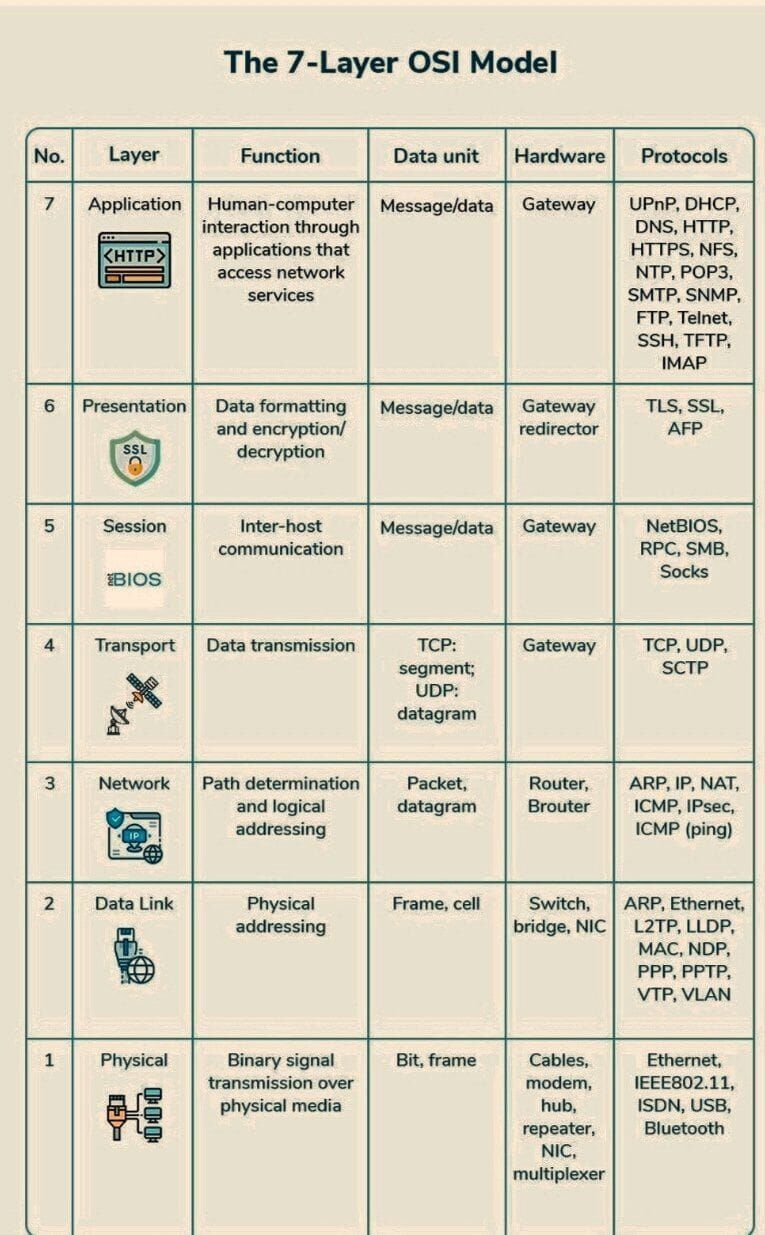
HTTP (Hypertext Transfer Protocol): This is the protocol your web browser uses to request and receive webpages from servers. When you type a URL into your browser, it sends an HTTP request to the server, which then sends back the webpage as a response. HTTP is a "stateless" protocol, meaning each request/response pair is independent.
HTTPS (HTTP Secure): HTTPS is HTTP with an extra layer of security. It encrypts the data exchanged between your browser and the server using SSL/TLS. This helps protect sensitive information (like passwords or credit card numbers) from being intercepted by third parties.
FTP (File Transfer Protocol): As the name suggests, FTP is used to transfer files between computers over a network. It's commonly used for uploading files to a web server. FTP establishes two connections - a command connection for sending instructions, and a data connection for actually transferring the files.
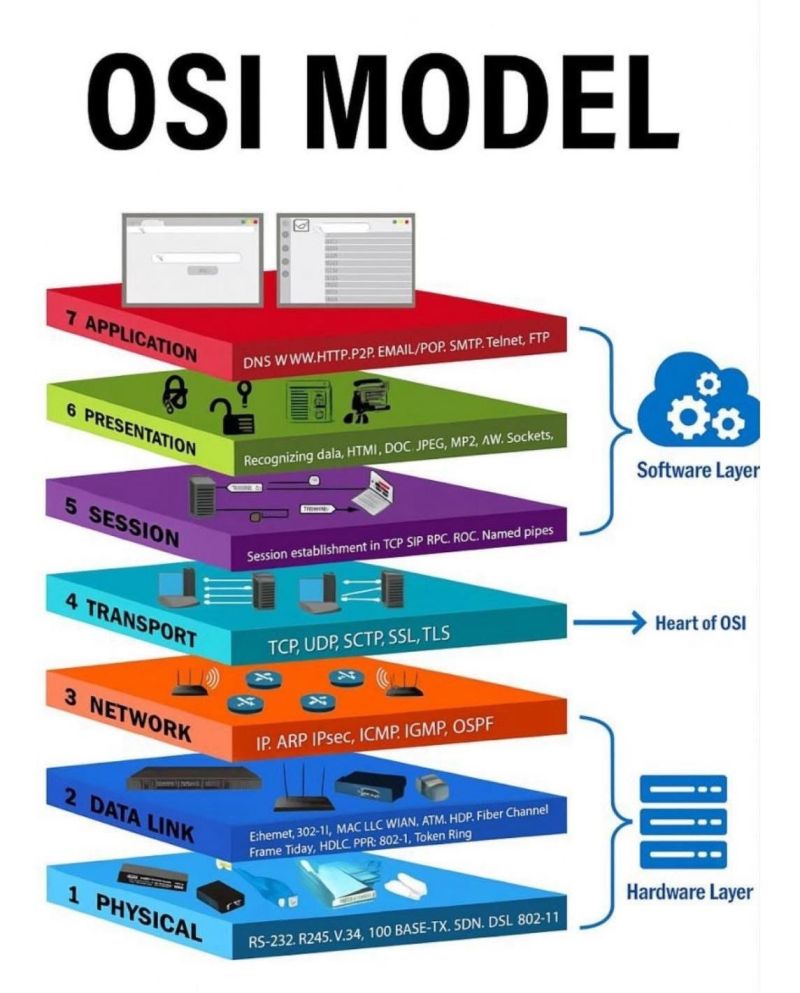
TCP (Transmission Control Protocol): TCP is all about reliable data delivery. When applications (like email clients or web browsers) send data using TCP, it establishes a connection and ensures that the data arrives intact and in the right order. If any data is lost along the way, TCP will resend it.
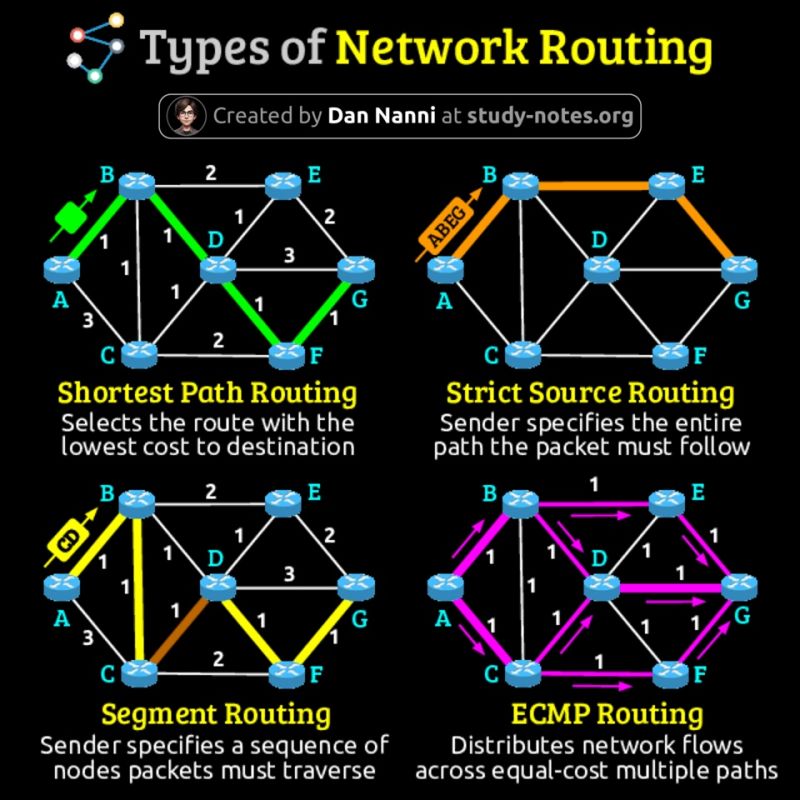
IP (Internet Protocol): IP is responsible for addressing and routing data packets across the internet. Each device on the internet has a unique IP address, which is used to send data to the correct destination. IP is an "unreliable" protocol, meaning it doesn't guarantee that packets will arrive at their destination or in the right order (that's TCP's job).
UDP (User Datagram Protocol): UDP is a simpler, faster alternative to TCP. It doesn't establish a connection or provide error checking. This makes it less reliable, but also much quicker - perfect for applications like video streaming or online gaming where a little data loss is acceptable.
SMTP (Simple Mail Transfer Protocol): This protocol handles the sending of email. When you send an email, your email client uses SMTP to send the message to your mail server, which then uses SMTP to send it to the recipient's mail server.
SSH (Secure Shell): SSH allows you to securely connect to a remote computer over an unsecured network. It's often used by system administrators to manage servers remotely. SSH provides encrypted communication between the two machines, ensuring that sensitive commands and data can't be intercepted.
[](https://resources.planforfailure.com/uploads/images/gallery/2025-10/v5CPacUFiFNT8SaC-osi-model.jpeg)
# HTML
[](https://resources.planforfailure.com/uploads/images/gallery/2024-04/GFR4oM2Gm03T76ps-html-codes.jpeg)
HTTP (Hypertext Transfer Protocol): This is the protocol your web browser uses to request and receive webpages from servers. When you type a URL into your browser, it sends an HTTP request to the server, which then sends back the webpage as a response. HTTP is a "stateless" protocol, meaning each request/response pair is independent.
HTTPS (HTTP Secure): HTTPS is HTTP with an extra layer of security. It encrypts the data exchanged between your browser and the server using SSL/TLS. This helps protect sensitive information (like passwords or credit card numbers) from being intercepted by third parties.
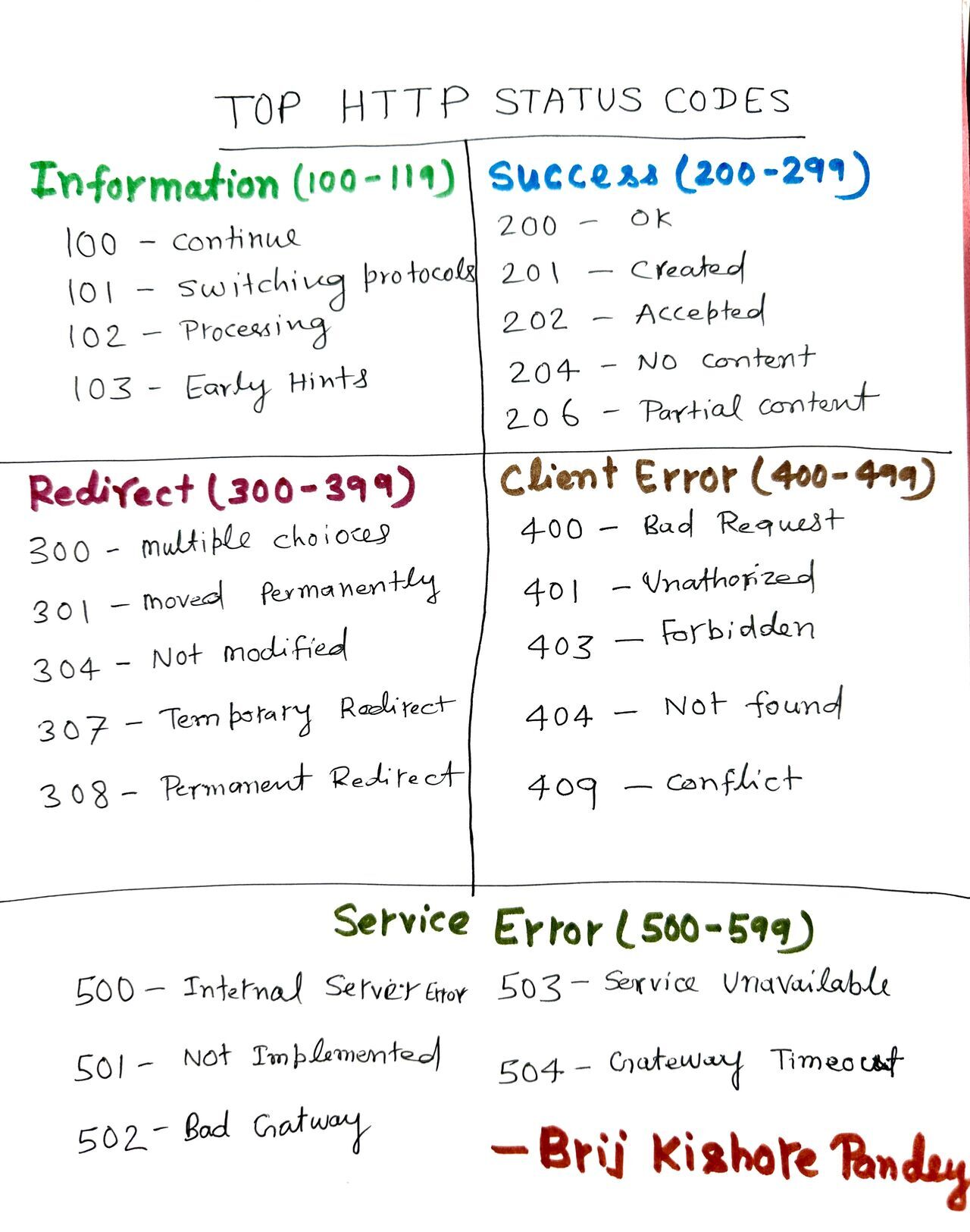
1️⃣ 1xx Informational:
100 Continue: Server received the request header and waits for the client to send the request body.
101 Switching Protocols: Client requested to switch protocols, and the server agreed.
2️⃣ 2xx Success:
200 OK: Standard response for successful HTTP requests.
201 Created: Request fulfilled, new resource created.
204 No Content: Request succeeded, but no new information to send back.
3️⃣ 3xx Redirection:
301 Moved Permanently: Resource has been moved permanently to a new location.
302 Found: Resource temporarily located at a different URL.
304 Not Modified: Cached version of the requested resource is still valid.
4️⃣ 4xx Client Errors:
400 Bad Request: Server couldn't understand the request.
401 Unauthorized: Authentication is required, and credentials are missing or incorrect.
404 Not Found: The requested resource could not be found.
5️⃣ 5xx Server Errors:
500 Internal Server Error: Generic error message from the server.
502 Bad Gateway: Server acting as a gateway received an invalid response from an upstream server.
503 Service Unavailable: Server is not ready to handle the request.
# System Design Fundamentals
[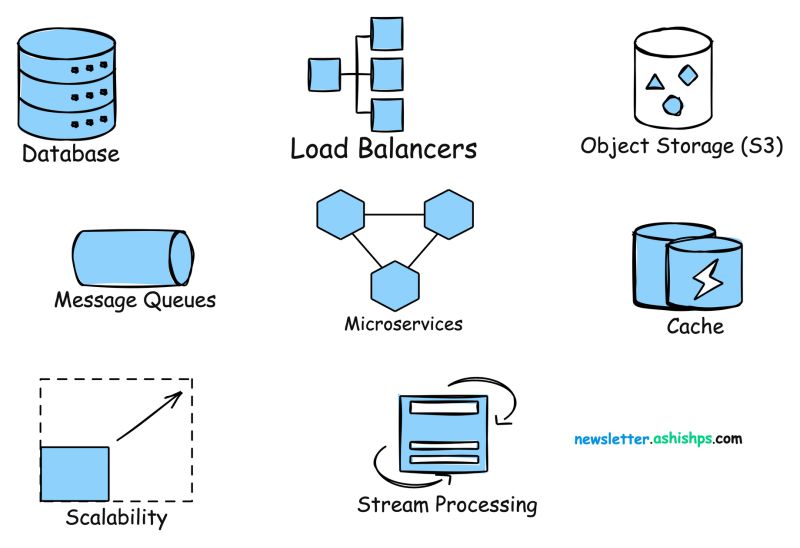](https://resources.planforfailure.com/uploads/images/gallery/2024-04/oagB1TebhKZXFl8O-design-fundamentals.jpeg)
📌 𝐒𝐲𝐬𝐭𝐞𝐦 𝐃𝐞𝐬𝐢𝐠𝐧 𝐊𝐞𝐲 𝐂𝐨𝐧𝐜𝐞𝐩𝐭𝐬
\- Scalability: [https://lnkd.in/gpge\_z76](https://lnkd.in/gpge_z76)
\- Latency vs Throughput: [https://lnkd.in/g\_amhAtN](https://lnkd.in/g_amhAtN)
\- CAP Theorem: [https://lnkd.in/g3hmVamx](https://lnkd.in/g3hmVamx)
\- ACID Transactions: [https://lnkd.in/gMe2JqaF](https://lnkd.in/gMe2JqaF)
\- Consistent Hashing: [https://lnkd.in/gd3eAQKA](https://lnkd.in/gd3eAQKA)
\- Rate Limiting: [https://lnkd.in/gWsTDR3m](https://lnkd.in/gWsTDR3m)
\- API Design: [https://lnkd.in/ghYzrr8q](https://lnkd.in/ghYzrr8q)
\- Strong vs Eventual Consistency: [https://lnkd.in/gJ-uXQXZ](https://lnkd.in/gJ-uXQXZ)
\- Synchronous vs. asynchronous communications: [https://lnkd.in/gC3F2nvr](https://lnkd.in/gC3F2nvr)
\- REST vs RPC: [https://lnkd.in/gN\_\_zcAB](https://lnkd.in/gN__zcAB)
\- Batch Processing vs Stream Processing: [https://lnkd.in/g4\_MzM4s](https://lnkd.in/g4_MzM4s)
\- Fault Tolerance: [https://lnkd.in/dVJ6n3wA](https://lnkd.in/dVJ6n3wA)
\- Consensus Algorithms: [https://lnkd.in/ggc3tFbr](https://lnkd.in/ggc3tFbr)
\- Gossip Protocol: [https://lnkd.in/gfPMtrJZ](https://lnkd.in/gfPMtrJZ)
\- Service Discovery: [https://lnkd.in/gjnrYkyF](https://lnkd.in/gjnrYkyF)
\- Disaster Recovery: [https://lnkd.in/g8rnr3V3](https://lnkd.in/g8rnr3V3)
\- Distributed Tracing: [https://lnkd.in/d6r5RdXG](https://lnkd.in/d6r5RdXG)
\- Top 15 Tradeoffs: [https://lnkd.in/gnM8QC-z](https://lnkd.in/gnM8QC-z)
🛠️ 𝐒𝐲𝐬𝐭𝐞𝐦 𝐃𝐞𝐬𝐢𝐠𝐧 𝐁𝐮𝐢𝐥𝐝𝐢𝐧𝐠 𝐁𝐥𝐨𝐜𝐤𝐬
\- Horizontal vs Vertical Scaling: [https://lnkd.in/gAH2e9du](https://lnkd.in/gAH2e9du)
\- Databases: [https://lnkd.in/gti8gjpz](https://lnkd.in/gti8gjpz)
\- Content Delivery Network (CDN): [https://lnkd.in/gjJrEJeH](https://lnkd.in/gjJrEJeH)
\- Domain Name System (DNS): [https://lnkd.in/gkMcZW8V](https://lnkd.in/gkMcZW8V)
\- Caching: [https://lnkd.in/gC9piQbJ](https://lnkd.in/gC9piQbJ)
\- Distributed Caching: [https://lnkd.in/g7WKydNg](https://lnkd.in/g7WKydNg)
\- Load Balancing: [https://lnkd.in/gQaa8sXK](https://lnkd.in/gQaa8sXK)
\- SQL vs NoSQL: [https://lnkd.in/g3WC\_yxn](https://lnkd.in/g3WC_yxn)
\- Database Indexs: [https://lnkd.in/gCeshYVt](https://lnkd.in/gCeshYVt)
\- HeartBeat: [https://lnkd.in/g4x7sMrF](https://lnkd.in/g4x7sMrF)
\- Circuit Breaker: [https://lnkd.in/gCxyFzKm](https://lnkd.in/gCxyFzKm)
\- Idempotency: [https://lnkd.in/gPm6EtKJ](https://lnkd.in/gPm6EtKJ)
\- Database Scaling: [https://lnkd.in/gAXpSyWQ](https://lnkd.in/gAXpSyWQ)
\- Data Replication: [https://lnkd.in/gVAJxTpS](https://lnkd.in/gVAJxTpS)
\- Data Redundancy: [https://lnkd.in/gNN7TF7n](https://lnkd.in/gNN7TF7n)
\- Database Sharding: [https://lnkd.in/gMqqc6x9](https://lnkd.in/gMqqc6x9)
\- Failover: [https://lnkd.in/dihZ-cEG](https://lnkd.in/dihZ-cEG)
\- Proxy Server: [https://lnkd.in/gi8KnKS6](https://lnkd.in/gi8KnKS6)
\- Message Queues: [https://lnkd.in/gTzY6uk8](https://lnkd.in/gTzY6uk8)
\- WebSockets: [https://lnkd.in/g76Gv2KQ](https://lnkd.in/g76Gv2KQ)
\- Bloom Filters: [https://lnkd.in/dt4QbSUz](https://lnkd.in/dt4QbSUz)
\- API Gateway: [https://lnkd.in/gnsJGJaM](https://lnkd.in/gnsJGJaM)
\- Distributed Locking: [https://lnkd.in/gRxNJwWE](https://lnkd.in/gRxNJwWE)
\- Checksum: [https://lnkd.in/ghNc5pfn](https://lnkd.in/ghNc5pfn)
🖇️ 𝐒𝐲𝐬𝐭𝐞𝐦 𝐃𝐞𝐬𝐢𝐠𝐧 𝐀𝐫𝐜𝐡𝐢𝐭𝐞𝐜𝐭𝐮𝐫𝐚𝐥 𝐏𝐚𝐭𝐭𝐞𝐫𝐧𝐬
\- Client-Server Architecture: [https://lnkd.in/dAARQYzq](https://lnkd.in/dAARQYzq)
\- Microservices Architecture: [https://lnkd.in/gFXUrz\_T](https://lnkd.in/gFXUrz_T)
\- Serverless Architecture: [https://lnkd.in/gQNAXKkb](https://lnkd.in/gQNAXKkb)
\- Event-Driven Architecture: [https://lnkd.in/dp8CPvey](https://lnkd.in/dp8CPvey)
\- Peer-to-Peer (P2P) Architecture: [https://lnkd.in/di32HDu3](https://lnkd.in/di32HDu3)
# 𝐀𝐫𝐜𝐡𝐢𝐭𝐞𝐜𝐭𝐮𝐫𝐚𝐥 𝐏𝐚𝐭𝐭𝐞𝐫𝐧𝐬
𝐖𝐡𝐚𝐭 𝐚𝐫𝐞 𝐀𝐫𝐜𝐡𝐢𝐭𝐞𝐜𝐭𝐮𝐫𝐚𝐥 𝐏𝐚𝐭𝐭𝐞𝐫𝐧𝐬?
Architectural patterns are standard strategies that define structural organization for software systems, providing a template for the architecture's design and module interactions.
Here are famous architectural patterns:
➡ 𝐄𝐯𝐞𝐧𝐭-𝐃𝐫𝐢𝐯𝐞𝐧: An event-driven architecture is a framework that orchestrates behavior around the production, detection, and consumption of events. Example use case: A real-time analytics system where events are generated by user activities and processed immediately.
➡ 𝐋𝐚𝐲𝐞𝐫𝐞𝐝: A layered architecture is a hierarchical pattern for structuring a system into groups of related functionalities, each layer having a specific role. Example use case: A web application with a presentation layer, business logic layer, and data access layer.
➡ 𝐌𝐨𝐧𝐨𝐥𝐢𝐭𝐡: A monolithic architecture is a traditional unified model for the design of a software program where all components are interwoven and interdependent. Example use case: A small-scale e-commerce website where the user interface, server-side application, and database are all on a single platform.
➡ 𝐌𝐢𝐜𝐫𝐨𝐬𝐞𝐫𝐯𝐢𝐜𝐞: Microservices architecture is an approach where a single application is composed of many loosely coupled and independently deployable smaller services. Example use case: A large-scale cloud-based application like Netflix, where each service runs a unique process and communicates through a well-defined, lightweight mechanism to serve a business goal.
➡ 𝐌𝐕𝐂 (𝐌𝐨𝐝𝐞𝐥-𝐕𝐢𝐞𝐰-𝐂𝐨𝐧𝐭𝐫𝐨𝐥𝐥𝐞𝐫): MVC is a design pattern that separates an application into three interconnected components: the model, the view, and the controller. Example use case: A desktop GUI application where user interface data (view), data manipulation (model), and input control (controller) are separated to simplify maintenance and scalability.
➡ 𝐌𝐚𝐬𝐭𝐞𝐫-𝐒𝐥𝐚𝐯𝐞: The master-slave pattern is a model where one master component controls one or more subordinate instances, called slaves. Example use case: A database replication system where the master database manages writes and the slave databases handle read operations to distribute the load.
# Load Balancing
𝗖𝗹𝗮𝘀𝘀𝗶𝗰 𝗕𝗮𝗹𝗮𝗻𝗰𝗶𝗻𝗴: Round Robin, Least Connections, Least Response Time, Least Bandwidth, Least Packets, IP Hash - These methods distribute traffic based on server availability, response times, or network usage.
𝗥𝗼𝘂𝗻𝗱 𝗥𝗼𝗯𝗶𝗻: The OG of load balancing, it sends requests in a circular fashion, ensuring everyone gets a turn. Think of it as a classroom attendance sheet – fair and simple!
𝗜𝗣 𝗛𝗮𝘀𝗵: This method assigns requests to a specific server based on the client's IP address. It's like having a personalized queue – users connect with the same server each time, building a rapport (and potentially faster response times).
𝗟𝗲𝗮𝘀𝘁 𝗖𝗼𝗻𝗻𝗲𝗰𝘁𝗶𝗼𝗻: Don't overload the busy servers! This method directs requests to the server with the fewest active connections, spreading the workload evenly. Imagine a buffet line – everyone heads to the shortest queue.
𝗟𝗲𝗮𝘀𝘁 𝗥𝗲𝘀𝗽𝗼𝗻𝘀𝗲 𝗧𝗶𝗺𝗲: Need lightning-fast responses? This method prioritizes the server with the quickest response time, ensuring users don't wait in laggy purgatory. Think of it as a VIP lane for the speediest servers.
𝗟𝗲𝗮𝘀𝘁 𝗕𝗮𝗻𝗱𝘄𝗶𝗱𝘁𝗵: Bandwidth hogging servers? Not on our watch! This method sends traffic to the server with the lowest current usage, optimizing bandwidth allocation. It's like a traffic cop directing cars to the least congested lanes.
𝗦𝘁𝗶𝗰𝗸𝘆 𝗦𝗲𝘀𝘀𝗶𝗼𝗻𝘀: Keeps users connected to the same server for their entire session, crucial for transactional websites.
𝗟𝗮𝘆𝗲𝗿 𝟳 𝗕𝗮𝗹𝗮𝗻𝗰𝗶𝗻𝗴: Analyzes traffic content (URLs, data types) for smarter routing decisions.
𝗚𝗲𝗼𝗴𝗿𝗮𝗽𝗵𝗶𝗰𝗮𝗹 𝗕𝗮𝗹𝗮𝗻𝗰𝗶𝗻𝗴: Routes users to the closest server for optimal latency and speed.
𝗗𝗡𝗦 𝗟𝗼𝗮𝗱 𝗕𝗮𝗹𝗮𝗻𝗰𝗶𝗻𝗴: Directs traffic using the DNS system, often before a connection is even established.
𝗧𝗿𝗮𝗻𝘀𝗽𝗼𝗿𝘁 𝗟𝗮𝘆𝗲𝗿 𝗕𝗮𝗹𝗮𝗻𝗰𝗶𝗻𝗴: Balances traffic based on protocols (TCP or UDP) for optimized handling.
𝗔𝗜-𝗣𝗼𝘄𝗲𝗿𝗲𝗱 𝗕𝗮𝗹𝗮𝗻𝗰𝗶𝗻𝗴: Utilizes AI to analyze real-time traffic and dynamically adjust routing for peak performance.
𝗕𝘂𝘁 𝗿𝗲𝗺𝗲𝗺𝗯𝗲𝗿, 𝘁𝗵𝗲𝗿𝗲'𝘀 𝗻𝗼 𝗼𝗻𝗲-𝘀𝗶𝘇𝗲-𝗳𝗶𝘁𝘀-𝗮𝗹𝗹 𝘀𝗼𝗹𝘂𝘁𝗶𝗼𝗻! The best method depends on your specific needs and traffic patterns. Consider factors like:
𝗧𝗿𝗮𝗳𝗳𝗶𝗰 𝘃𝗼𝗹𝘂𝗺𝗲: How much traffic are you expecting?
𝗦𝗲𝗿𝘃𝗲𝗿 𝗰𝗮𝗽𝗮𝗯𝗶𝗹𝗶𝘁𝗶𝗲𝘀: What are your servers' performance limitations?
𝗔𝗽𝗽𝗹𝗶𝗰𝗮𝘁𝗶𝗼𝗻 𝘁𝘆𝗽𝗲: Is your application latency-sensitive?
# Software Testing
1️⃣ 𝗙𝘂𝗻𝗰𝘁𝗶𝗼𝗻𝗮𝗹 𝗧𝗲𝘀𝘁𝗶𝗻𝗴: 𝗧𝗵𝗲 𝗕𝗮𝘀𝗶𝗰𝘀:
Unit Testing: Isolating individual code units to ensure they work as expected. Think of it as testing each brick before building a wall.
Integration Testing: Verifying how different modules work together. Imagine testing how the bricks fit into the wall.
System Testing: Putting it all together, ensuring the entire system functions as designed. Now, test the whole building for stability and functionality.
Acceptance Testing: The final hurdle! Here, users or stakeholders confirm the software meets their needs. Think of it as the grand opening ceremony for your building.
2️⃣ 𝗡𝗼𝗻-𝗙𝘂𝗻𝗰𝘁𝗶𝗼𝗻𝗮𝗹 𝗧𝗲𝘀𝘁𝗶𝗻𝗴: 𝗕𝗲𝘆𝗼𝗻𝗱 𝘁𝗵𝗲 𝗕𝗮𝘀𝗶𝗰𝘀: ️
Performance Testing: Assessing speed, responsiveness, and scalability under different loads. Imagine testing how many people your building can safely accommodate.
Security Testing: Identifying and mitigating vulnerabilities to protect against cyberattacks. Think of it as installing security systems and testing their effectiveness.
Usability Testing: Evaluating how easy and intuitive the software is to use. Imagine testing how user-friendly your building is for navigation and accessibility.
3️⃣ 𝗢𝘁𝗵𝗲𝗿 𝗧𝗲𝘀𝘁𝗶𝗻𝗴 𝗔𝘃𝗲𝗻𝘂𝗲𝘀: 𝗧𝗵𝗲 𝗦𝗽𝗲𝗰𝗶𝗮𝗹𝗶𝘇𝗲𝗱 𝗖𝗿𝗲𝘄:
Regression Testing: Ensuring new changes haven't broken existing functionality. Imagine checking your building for cracks after renovations.
Smoke Testing: A quick sanity check to ensure basic functionality before further testing. Think of turning on the lights and checking for basic systems functionality before a deeper inspection.
Exploratory Testing: Unstructured, creative testing to uncover unexpected issues. Imagine a detective searching for hidden clues in your building.
# LVM/Linux Boot
[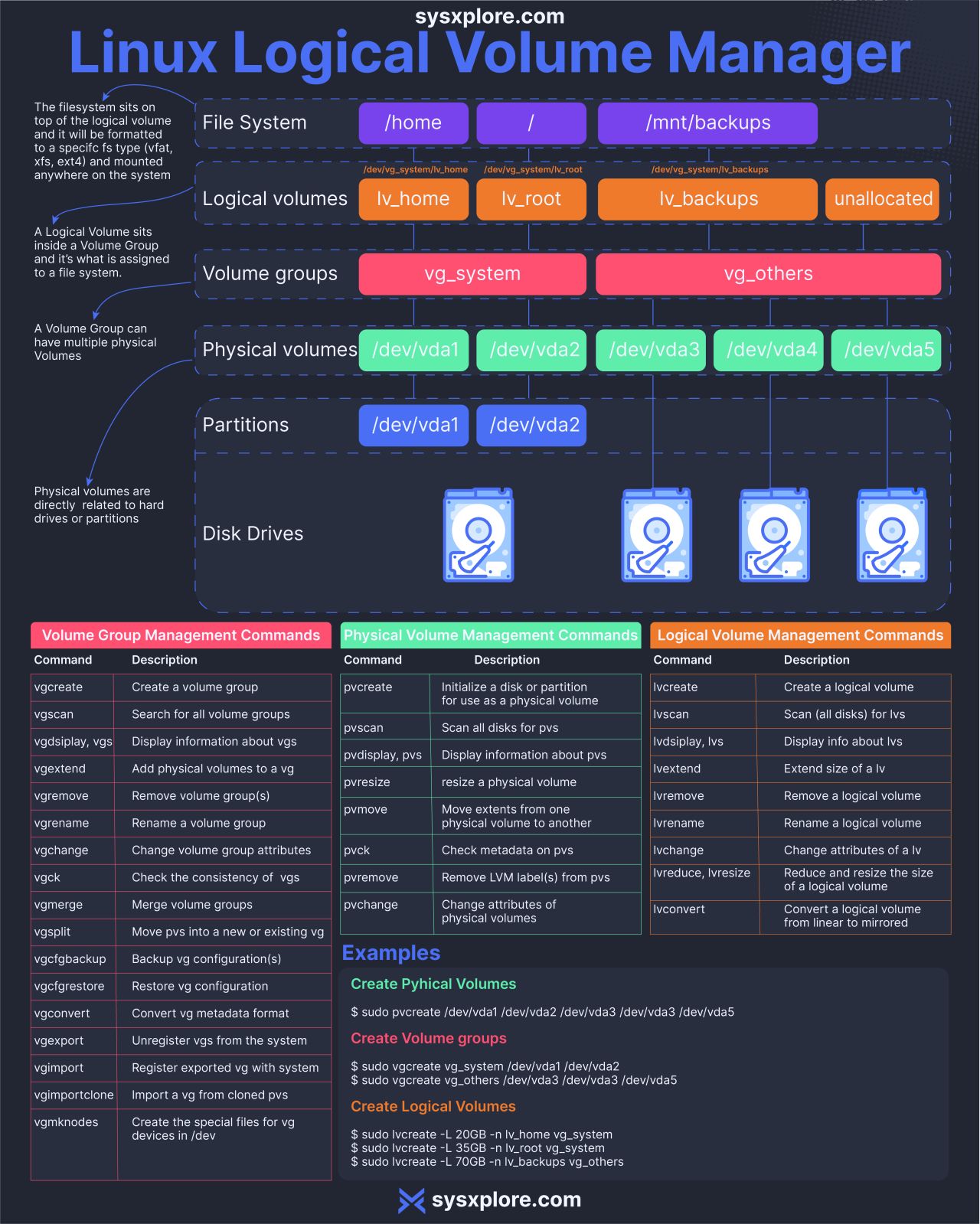](https://resources.planforfailure.com/uploads/images/gallery/2024-04/3XxVk2xZxyKIfDKE-lvm.jpeg)
Linux Boot Process
The diagram below shows the steps.
Step 1 - When we turn on the power, BIOS (Basic Input/Output System) or UEFI (Unified Extensible Firmware Interface) firmware is loaded from non-volatile memory, and executes POST (Power On Self Test).
Step 2 - BIOS/UEFI detects the devices connected to the system, including CPU, RAM, and storage.
Step 3 - Choose a booting device to boot the OS from. This can be the hard drive, the network server, or CD ROM.
Step 4 - BIOS/UEFI runs the boot loader (GRUB), which provides a menu to choose the OS or the kernel functions.
Step 5 - After the kernel is ready, we now switch to the user space. The kernel starts up systemd as the first user-space process, which manages the processes and services, probes all remaining hardware, mounts filesystems, and runs a desktop environment.
Step 6 - systemd activates the default. target unit by default when the system boots. Other analysis units are executed as well.
Step 7 - The system runs a set of startup scripts and configure the environment.
Step 8 - The users are presented with a login window. The system is now ready.
# Databases
Relational Databases (RDBMS)
The most common type, including MySQL, Oracle, SQL Server. Organize data into tables with defined relations. Great for complex queries and ensuring data integrity. Used for most business applications.
NoSQL Databases
Non-relational databases like MongoDB and Cassandra. Flexible schemas, handle unstructured data. Faster performance for large amounts of data. Used for big data, content management, and real-time apps.
Graph Databases
Store data in nodes and relationships like Neo4j. Optimal for networked data and social relationships. Used for fraud detection, recommendations, and knowledge graphs.
Time Series Databases
Optimized for timeseries data that is timestamped and sequenced like InfluxDB. Used for IoT, DevOps, and sensor data analytics.
Object Databases
Store data as objects like db4o. Useful for working with media files, search engines, and engineering design systems.
There are many factors in selecting the right database for your needs - data structure, relationships, scalability, performance.
# Search Engines
1. 𝗖𝗿𝗮𝘄𝗹𝗶𝗻𝗴:
\- Search engines deploy automated programs known as 'crawlers' or 'spiders'.
\- These crawlers scour the internet to find new or updated content, moving from link to link and collecting data.
2\. 𝗜𝗻𝗱𝗲𝘅𝗶𝗻𝗴:
\- The content found by crawlers is then organized in an indexing process.
\- This process is similar to building a vast digital library, where each webpage is cataloged for easy retrieval later.
3\. 𝗥𝗮𝗻𝗸𝗶𝗻𝗴 𝗮𝗻𝗱 𝗥𝗲𝘁𝗿𝗶𝗲𝘃𝗮𝗹:
\- When you search, the engine sifts through its extensive index using complex algorithms to find pages matching your keywords.
\- The algorithm assesses not just the match but also the relevance and quality of the content, considering factors like keyword density, backlinks, and domain authority.
\- Pages that are deemed most relevant and high-quality are ranked higher in search results.
𝗧𝗵𝗲 𝗗𝘆𝗻𝗮𝗺𝗶𝗰 𝗡𝗮𝘁𝘂𝗿𝗲 𝗼𝗳 𝗦𝗲𝗮𝗿𝗰𝗵 𝗘𝗻𝗴𝗶𝗻𝗲𝘀:
\- Search engines constantly evolve by learning from user interactions. They monitor how users engage with search results, such as which links are clicked and time spent on pages. This feedback refines their algorithms, enhancing result accuracy over time.
\- If enabled, your search history can personalize your search experience, as the engine tailors results based on your past searches.
# AI/Big Data
𝗔𝗜 𝗘𝘁𝗵𝗶𝗰𝘀: Emphasises the importance of ethical considerations in AI development, including bias prevention and accountability.
\- 𝗠𝗮𝗰𝗵𝗶𝗻𝗲 𝗟𝗲𝗮𝗿𝗻𝗶𝗻𝗴 & 𝗗𝗲𝗲𝗽 𝗟𝗲𝗮𝗿𝗻𝗶𝗻𝗴: Explains the algorithms that enable machines to learn from data, highlighting examples such as fraud detection and image recognition.
\- 𝗕𝗶𝗴 𝗗𝗮𝘁𝗮: Addresses the vast volumes of data processed and the importance of data management and analysis for valuable insights.
\- 𝗗𝗮𝘁𝗮 𝗦𝗰𝗶𝗲𝗻𝗰𝗲: Covers the entire spectrum of extracting knowledge from data, including predictive modelling and data mining.
\- 𝗡𝗲𝘂𝗿𝗮𝗹 𝗡𝗲𝘁𝘄𝗼𝗿𝗸𝘀: Discusses the architecture inspired by the human brain that's at the core of many AI functions, especially in pattern recognition.
\- 𝗦𝘂𝗽𝗲𝗿𝘃𝗶𝘀𝗲𝗱 & 𝗨𝗻𝘀𝘂𝗽𝗲𝗿𝘃𝗶𝘀𝗲𝗱 𝗟𝗲𝗮𝗿𝗻𝗶𝗻𝗴: Distinguishes between learning with labelled data and discovering hidden patterns without labelled data.
\- 𝗧𝗲𝘅𝘁 𝗔𝗻𝗮𝗹𝘆𝘀𝗶𝘀 & 𝗡𝗟𝗣: Delves into the processing of human language, sentiment analysis, and translation, showcasing how AI can understand and generate human language.
\- 𝗚𝗔𝗡 (𝗚𝗲𝗻𝗲𝗿𝗮𝘁𝗶𝘃𝗲 𝗔𝗱𝘃𝗲𝗿𝘀𝗮𝗿𝗶𝗮𝗹 𝗡𝗲𝘁𝘄𝗼𝗿𝗸): Introduces the concept of competing neural networks, which can generate new data that mimics real-world distributions.
\- 𝗖𝗼𝗺𝗽𝘂𝘁𝗲𝗿 𝗩𝗶𝘀𝗶𝗼𝗻: Describes how machines interpret visual information from the world, applied in areas like facial recognition and autonomous driving.
\- 𝗗𝗮𝘁𝗮 𝗔𝗻𝗮𝗹𝘆𝘁𝗶𝗰𝘀 & 𝗩𝗶𝘀𝘂𝗮𝗹𝗶𝘇𝗮𝘁𝗶𝗼𝗻: Emphasises the importance of interpreting data to make informed decisions, and the visualisation of complex data to make it understandable at a glance.
\- 𝗣𝗿𝗲𝗱𝗶𝗰𝘁𝗶𝘃𝗲 𝗔𝗻𝗮𝗹𝘆𝘁𝗶𝗰𝘀: Focuses on using historical data to predict future outcomes, essential for risk assessment and strategic planning.