# Devops
Jenkins, CICD, Git, Docker, Podman, Terraform, Microservices, Monitoring, Python, Roadmap
# Jenkins
[How CICD Works](https://planforfailure.com/docs/gif/cicd_works.gif)
🔴 Learn Jenkins! Complete Jenkins Course -
Zero to Hero
[https://lnkd.in/dGrGmhut](https://lnkd.in/dGrGmhut)
🔴 Jenkins CI CD By Mr. Ashok | DevOps Tools
[https://lnkd.in/d9swuiWJ](https://lnkd.in/d9swuiWJ)
🔴 Jenkins Full Course | Jenkins Tutorial For Beginners
[https://lnkd.in/d-\_qhBXM](https://lnkd.in/d-_qhBXM)
🔴 Jenkins Full Course in 4 Hours | Jenkins Tutorial For Beginners
[https://lnkd.in/d-wjPAKh](https://lnkd.in/d-wjPAKh)
🔴 Jenkins Tutorial for Beginners
[https://lnkd.in/dDrrsnTg](https://lnkd.in/dDrrsnTg)
🔴 Jenkins Full Course
[https://lnkd.in/dRXbYtXd](https://lnkd.in/dRXbYtXd)
🔴 Advanced Jenkins tutorial
[https://lnkd.in/dVcxrYE3](https://lnkd.in/dVcxrYE3)
2\. LABS
🔴 Jenkins Tutorial - How to Deploy a Test Server with Docker + Linux (Full Course)
[https://lnkd.in/dNG2jBFN](https://lnkd.in/dNG2jBFN)
🔴 Live DevOps Project for Resume - Jenkins
CICD with Git Hub Integration
[https://lnkd.in/dGcmFHMY](https://lnkd.in/dGcmFHMY)
🔴 JENKINS PIPELINE FROM SCRATCH
[https://lnkd.in/dm29aWBa](https://lnkd.in/dm29aWBa)
🔴 Amit Kumar Gupta : Cicd Series 1-9
[https://lnkd.in/dvitBdfd](https://lnkd.in/dvitBdfd)
🔴 CICD pipeline for Java application to deploy on kubernetes cluster using Jenkins
[https://lnkd.in/dNG4BaJu](https://lnkd.in/dNG4BaJu)
🔴 Jenkins Cicd deployment
[https://lnkd.in/dhNjHvjH](https://lnkd.in/dhNjHvjH)
🔴 Mega Real-time End to End DevOps CI/CD Project Git Jenkins Nexus SonarQube| HandsOn Lab
[https://lnkd.in/deCvSKf7](https://lnkd.in/deCvSKf7)
🔴 Setting up CI-CD Pipeline for an E-Commerce App
[https://lnkd.in/dPH4z4Af](https://lnkd.in/dPH4z4Af)
[https://lnkd.in/d-xzCR8F](https://lnkd.in/d-xzCR8F)
🔴 Jenkins CI/CD Workflow Implementation with Real-time
[https://lnkd.in/daGQ28BC](https://lnkd.in/daGQ28BC)
🔴 Production Ready CI/CD Pipeline Setup
[https://lnkd.in/d\_BeVj65](https://lnkd.in/d_BeVj65)
# CI vs CD
Adopting modern development practices like [continuous integration (CI), continuous delivery (CD), and continuous deployment ](https://planforfailure.com/docs/cicd.gif)can help teams meet these demands and ship software more frequently.
But what's the difference between these three approaches?
𝗖𝗼𝗻𝘁𝗶𝗻𝘂𝗼𝘂𝘀 𝗜𝗻𝘁𝗲𝗴𝗿𝗮𝘁𝗶𝗼𝗻
Continuous integration is the practice of merging developer working copies to shared repositories multiple times per day.
With CI, developers frequently commit their code changes to a shared version control repository.
Each commit triggers an automated build and test process to catch integration errors as early as possible.
CI helps teams avoid "integration hell" that can happen when developers work in isolation for too long before merging their changes.
𝗖𝗼𝗻𝘁𝗶𝗻𝘂𝗼𝘂𝘀 𝗗𝗲𝗹𝗶𝘃𝗲𝗿𝘆
Continuous delivery takes CI a step further with automated releases.
CD means that at any point, you can push a button to release the latest app version to users.
The CD pipeline deploys each code change to a testing/staging environment and runs automated tests to confirm the app is production ready.
This ensures developers always have a releasable artifact that has passed tests.
While CD enables releasing often, someone still needs to manually push the button to promote changes to production.
𝗖𝗼𝗻𝘁𝗶𝗻𝘂𝗼𝘂𝘀 𝗗𝗲𝗽𝗹𝗼𝘆𝗺𝗲𝗻𝘁
Continuous deployment fully automates the release process.
Every code commit that passes the automated tests triggers an immediate production deployment.
This enables teams to ship features as fast as developers write code.
However, the business may not want to release daily since this could overwhelm users with constant changes.
Many teams use feature flags so developers can deploy new features, but limit their exposure until the business is ready for the public launch.
Adopting CI, CD, and CD practices can accelerate a team's ability to safely deliver innovation.
The key is automating repetitive processes to limit manual errors, provide rapid feedback, and reduce risk.
This frees up developers to focus their energy on writing great code rather than building and deploying it.
The outcome is faster time-to-market and more frequent delivery of customer value.
# Fundamentals
[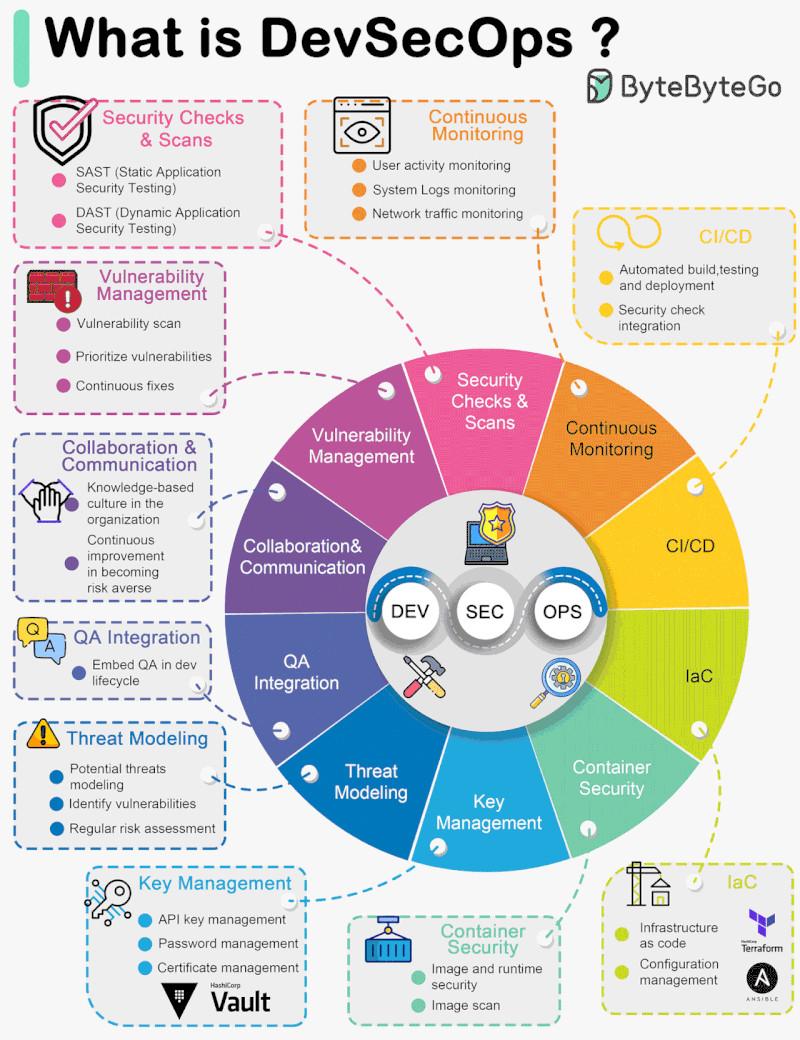](https://resources.planforfailure.com/uploads/images/gallery/2024-05/Ia9TXgGkdUj9s2ws-devsecops.jpg)
𝗨𝗻𝗱𝗲𝗿𝘀𝘁𝗮𝗻𝗱𝗶𝗻𝗴 𝘁𝗵𝗲 𝟲 𝗘𝘀𝘀𝗲𝗻𝘁𝗶𝗮𝗹 𝗖𝗼𝗺𝗽𝗼𝗻𝗲𝗻𝘁𝘀 𝗼𝗳 𝗗𝗲𝘃𝗢𝗽𝘀: 𝗔 𝗩𝗶𝘀𝘂𝗮𝗹 𝗕𝗿𝗲𝗮𝗸𝗱𝗼𝘄𝗻
[DevOps](https://planforfailure.com/docs/devops.gif) is an essential practice in modern software development, emphasizing collaboration, automation, and continuous improvement.
By dissecting the attached visual, we can highlight six critical components that form the backbone of an effective DevOps environment:
1️⃣ 𝗖𝗼𝗻𝘁𝗶𝗻𝘂𝗼𝘂𝘀 𝗗𝗲𝗹𝗶𝘃𝗲𝗿𝘆: This element ensures that code changes are automatically built, tested, and prepared for a release to production, fostering a faster and more reliable delivery process.
2️⃣ 𝗖𝗼𝗻𝗳𝗶𝗴𝘂𝗿𝗮𝘁𝗶𝗼𝗻 𝗠𝗮𝗻𝗮𝗴𝗲𝗺𝗲𝗻𝘁 𝗦𝘆𝘀𝘁𝗲𝗺: Central to DevOps, this system maintains computer systems, servers, and software in a desired, consistent state. It's the nerve center that enables scalable and manageable technology landscapes.
3️⃣ 𝗖𝗼𝗻𝗳𝗶𝗴𝘂𝗿𝗮𝘁𝗶𝗼𝗻 𝗜𝗻𝘁𝗲𝗴𝗿𝗮𝘁𝗶𝗼𝗻: This process merges development work with the main branch as often as possible, validating each integration with an automated build and test. It's all about keeping the codebase stable and accelerating the development cycle.
4️⃣ 𝗛𝗲𝗮𝗹𝘁𝗵 𝗠𝗼𝗻𝗶𝘁𝗼𝗿𝗶𝗻𝗴 𝗮𝗻𝗱 𝗔𝘂𝘁𝗼𝗺𝗮𝘁𝗲𝗱 𝗖𝗵𝗲𝗰𝗸𝘀: Proactive monitoring tools like Nagios keep tabs on system health and performance, triggering automated checks to ensure everything is running smoothly and efficiently.
5️⃣ 𝗜𝗻𝗳𝗿𝗮𝘀𝘁𝗿𝘂𝗰𝘁𝘂𝗿𝗲 𝗮𝘀 𝗖𝗼𝗱𝗲 (𝗜𝗮𝗖): This paradigm uses machine-readable [definition files](https://planforfailure.com/docs/terraform_cs.pdf), rather than manual processes, to manage and provision the IT infrastructure. It ensures the environment is replicable, transparent, and consistent.
6️⃣ 𝗖𝗜/𝗖𝗗 𝗣𝗶𝗽𝗲𝗹𝗶𝗻𝗲: The combination of Continuous Integration (CI) with Continuous Delivery (CD) automates the delivery of applications to various environments, streamlining and speeding up the release process.
Together, these components interlink to create a robust ecosystem that supports the DevOps methodology's goals: accelerating deployments, enhancing reliability, and building a culture of continuous improvement.
⚙️ 𝗖𝗜/𝗖𝗗:
\- Jenkins:[ jenkins.io](https://jenkins.io)
\- Travis CI:[https://docs.travis-ci.com/](https://docs.travis-ci.com/)
\- CircleCI: [circleci.com](https://circleci.com)
\- GitLab CI/CD: [docs.gitlab.com/ee/ci](https://docs.gitlab.com/ee/ci)
🧩 𝗢𝗿𝗰𝗵𝗲𝘀𝘁𝗿𝗮𝘁𝗶𝗼𝗻:
\- Kubernetes Documentation: [kubernetes.io/docs/home](https://kubernetes.io/docs/home)
\- Kubernetes the Hard Way: [https://lnkd.in/edWs7\_FW](https://lnkd.in/edWs7_FW)
\- CNCF Curriculum: [cncf.io](https://cncf.io)
\- Kubernetes Fundamentals : [https://lnkd.in/e55BRxGy](https://lnkd.in/e55BRxGy)
🔍 𝗢𝗯𝘀𝗲𝗿𝘃𝗮𝗯𝗶𝗹𝗶𝘁𝘆:
\- Prometheus: [prometheus.io](https://prometheus.io)
\- Grafana: [grafana.com](https://grafana.com)
\- Elasticsearch: [elastic.co](https://elastic.co)
\- Jaeger: [https://lnkd.in/eiFkzXwD](https://lnkd.in/eiFkzXwD)
📜 𝗜𝗻𝗳𝗿𝗮𝘀𝘁𝗿𝘂𝗰𝘁𝘂𝗿𝗲 𝗮𝘀 𝗖𝗼𝗱𝗲 (𝗜𝗮𝗖):
\- Terraform: [terraform.io ](https://terraform.io)
\- AWS CloudFormation: [https://lnkd.in/e4wGb2eT](https://lnkd.in/e4wGb2eT)
\- Azure Resource Manager: [https://lnkd.in/eWzjg94i](https://lnkd.in/eWzjg94i)
\- Deployment Manager: [https://lnkd.in/ekAQpT3n](https://lnkd.in/ekAQpT3n)
🔏 𝗣𝗼𝗹𝗶𝗰𝘆 𝗮𝘀 𝗖𝗼𝗱𝗲:
\- Open Policy Agent: [https://lnkd.in/eG4jMZSU](https://lnkd.in/eG4jMZSU)
\- Kyverno: [kyverno.io/docs](https://kyverno.io/docs)
\- Rego: [https://lnkd.in/eD75meCB](https://lnkd.in/eD75meCB)
🕸️ 𝗦𝗲𝗿𝘃𝗶𝗰𝗲 𝗠𝗲𝘀𝗵:
\- Istio: [https://lnkd.in/eaxdAMZC](https://lnkd.in/eaxdAMZC)
\- Linkerd:[ linkerd.io](https://linkerd.io)
\- Consul Service Mesh: [https://lnkd.in/eEn3eacn](https://lnkd.in/eEn3eacn)
🐧 𝗟𝗶𝗻𝘂𝘅:
\- The Linux Foundation: [https://lnkd.in/epkP5dYQ](https://lnkd.in/epkP5dYQ)
\- Linux Documentation: [https://lnkd.in/eWNYW246](https://lnkd.in/eWNYW246)
\- Fedora Project: [fedoraproject.org](https://fedoraproject.org)
🐍 𝗦𝗰𝗿𝗶𝗽𝘁𝗶𝗻𝗴:
\- Python:[ learnpython.org](https://learnpython.org)
\- Go: [go.dev/tour](https://go.dev/tour)
\- Automate with Python:[ automatetheboringstuff.com](https://automatetheboringstuff.com)
\- Golang Bootcamp:[ https://lnkd.in/eSsK7KUG](https://lnkd.in/eSsK7KUG)
🤖𝗔𝗜 𝗳𝗼𝗿 𝗗𝗲𝘃𝗼𝗽𝘀:
\- GenAI - [https://brij.guru/ai](https://brij.guru/ai)
🌐 𝗡𝗲𝘁𝘄𝗼𝗿𝗸𝗶𝗻𝗴:
\- Cisco Networking Academy: [netacad.com](https://netacad.com)
\- Networking Fundamentals: [https://lnkd.in/eQ62Bfza](https://lnkd.in/eQ62Bfza)
\- Networking: A Top-Down Approach: [kurose.cslash.net](https://kurose.cslash.net)
\- FreeCodeCamp's Course: [https://lnkd.in/ecAsMH2w](https://lnkd.in/ecAsMH2w)
🔀 𝗚𝗶𝘁:
\- Git SCM: [git-scm.com](https://git-scm.com)
\- Try Git: [github.com/Try](https://github.com/try)
\- Git Tutorials: [https://lnkd.in/eDbQBQfD](https://lnkd.in/eDbQBQfD)
\- Git Interactive Tutorial: [https://lnkd.in/eqfE2ZC4](https://lnkd.in/eqfE2ZC4)
🐳 𝗖𝗼𝗻𝘁𝗮𝗶𝗻𝗲𝗿𝘀:
\- Docker Documentation: [docs.docker.com](https://hub.docker.com)
\- Docker Hub: [hub.docker.com](https://hub.docker.com)
\- Docker Labs: [dockerlabs.collabnix.com](https://dockerlabs.collabnix.com)
\- Kubernetes Fundamentals : [https://lnkd.in/eurRUTSt](https://lnkd.in/eurRUTSt)
☁️ 𝗖𝗹𝗼𝘂𝗱:
\- AWS Free Tier: [aws.amazon.com/free](https://aws.amazon.com/free)
\- Microsoft Azure Free Account: [https://lnkd.in/ehxD777x](https://lnkd.in/ehxD777x)
\- Google Cloud Platform Free Tier: [cloud.google.com/free](https://cloud.google.com/free)
\- Cloud Academy: [cloudacademy.com](https://cloudacademy.com)
# Microservice Components
𝗠𝗶𝗰𝗿𝗼𝘀𝗲𝗿𝘃𝗶𝗰𝗲𝘀 𝗔𝗿𝗰𝗵𝗶𝘁𝗲𝗰𝘁𝘂𝗿𝗲
The image illustrates a sophisticated [Microservices](https://planforfailure.com/docs/microservices.gif) Architecture framework that enables an agile, scalable, and robust software system.
This architecture is designed to handle complex applications by breaking them down into smaller, manageable, and independent services that work together seamlessly.
1\. 𝗔𝗣𝗜 𝗚𝗮𝘁𝗲𝘄𝗮𝘆:
\- Acts as the single-entry point for all client requests. It routes each request to the appropriate microservice and also aggregates the responses. This gateway provides essential services such as request routing, composition, and protocol translation.
2\. 𝗦𝗲𝗿𝘃𝗶𝗰𝗲 𝗠𝗲𝘀𝗵:
\- A dedicated infrastructure layer that facilitates service-to-service communications between microservices, ensuring that they are fast, reliable, and secure. It handles service discovery, load balancing, and recovery from failures.
3\. 𝗠𝗶𝗰𝗿𝗼𝘀𝗲𝗿𝘃𝗶𝗰𝗲𝘀 (𝗜𝗻𝘀𝘁𝗮𝗻𝗰𝗲𝘀 𝗔 𝗮𝗻𝗱 𝗕):
\- These are the individual services that make up the application, each running in its own process and communicating with lightweight mechanisms, often an HTTP resource API. They are independently deployable and scalable.
4\. 𝗦𝘂𝗽𝗽𝗼𝗿𝘁𝗶𝗻𝗴 𝗦𝗲𝗿𝘃𝗶𝗰𝗲𝘀:
\- 𝗖𝗼𝗻𝗳𝗶𝗴 𝗦𝘁𝗼𝗿𝗲: Centralized service for managing configuration files across all microservices.
\- 𝗜𝗱𝗲𝗻𝘁𝗶𝘁𝘆 𝗣𝗿𝗼𝘃𝗶𝗱𝗲𝗿: Manages user authentication and authorizations for secure access to services.
\- 𝗕𝗮𝗰𝗸𝗶𝗻𝗴 𝗦𝗲𝗿𝘃𝗶𝗰𝗲𝘀: These are the various databases, messaging systems (MOM), and other persistent storage services that microservices use to store and retrieve data.
5\. 𝗢𝗽𝗲𝗿𝗮𝘁𝗶𝗼𝗻𝗮𝗹 𝗦𝗲𝗿𝘃𝗶𝗰𝗲𝘀:
\- 𝗧𝗲𝗹𝗲𝗺𝗲𝘁𝗿𝘆: This includes monitoring, logging, and diagnostics to keep track of the health and performance of microservices.
\- 𝗖𝗼𝗻𝘁𝗮𝗶𝗻𝗲𝗿 𝗠𝗮𝗻𝗮𝗴𝗲𝗺𝗲𝗻𝘁: Manages the lifecycle of containers where microservices are deployed.
6\. 𝗖𝗜/𝗖𝗗 𝗔𝘂𝘁𝗼𝗺𝗮𝘁𝗶𝗼𝗻:
\- Continuous Integration and Continuous Deployment pipelines that automate the building, testing, and deployment of microservices, ensuring that new features and updates can be released quickly and reliably.
7\. 𝗖𝗹𝗶𝗲𝗻𝘁 𝗔𝗽𝗽𝗹𝗶𝗰𝗮𝘁𝗶𝗼𝗻𝘀:
\- These are the various consumer-facing applications like mobile apps, web browsers, or third-party services that interact with the API Gateway.
The diagram also categorizes the components into 'Inner Architecture', which includes the core microservices and their immediate supporting services, and 'Outer Architecture Capability', which represents the operational and automation tools that support the microservices infrastructure.
# Docker
𝗜𝗺𝗮𝗴𝗲 𝗠𝗮𝗻𝗮𝗴𝗲𝗺𝗲𝗻𝘁
\- Use 𝚍𝚘𝚌𝚔𝚎𝚛 𝚋𝚞𝚒𝚕𝚍 to create images from Dockerfiles, the blueprint for containers.
\- 𝚍𝚘𝚌𝚔𝚎𝚛 𝚙𝚞𝚕𝚕 to download pre-built images from registries like Docker Hub.
\- 𝚍𝚘𝚌𝚔𝚎𝚛 𝚙𝚞𝚜𝚑 to upload your images to remote registries.
\- 𝚍𝚘𝚌𝚔𝚎𝚛 𝚒𝚖𝚊𝚐𝚎𝚜 lists locally stored images.
\- 𝚍𝚘𝚌𝚔𝚎𝚛 𝚛𝚖𝚒 removes unwanted images.
\- 𝚍𝚘𝚌𝚔𝚎𝚛 𝚝𝚊𝚐 tags images for organizational purposes.
𝗖𝗼𝗻𝘁𝗮𝗶𝗻𝗲𝗿 𝗟𝗶𝗳𝗲𝗰𝘆𝗰𝗹𝗲
\- 𝚍𝚘𝚌𝚔𝚎𝚛 𝚛𝚞𝚗 launches a container from an image.
\- 𝚍𝚘𝚌𝚔𝚎𝚛 𝚜𝚝𝚘𝚙 and 𝚍𝚘𝚌𝚔𝚎𝚛 𝚔𝚒𝚕𝚕 halt running containers gracefully or forcibly.
\- 𝚍𝚘𝚌𝚔𝚎𝚛 𝚛𝚎𝚜𝚝𝚊𝚛𝚝 restarts a stopped container.
\- 𝚍𝚘𝚌𝚔𝚎𝚛 𝚛𝚎𝚗𝚊𝚖𝚎 to rename existing containers.
\- 𝚍𝚘𝚌𝚔𝚎𝚛 𝚕𝚘𝚐𝚜 prints logs of a container.
\- 𝚍𝚘𝚌𝚔𝚎𝚛 𝚎𝚡𝚎𝚌 runs commands interactively in a container.
𝗡𝗲𝘁𝘄𝗼𝗿𝗸𝗶𝗻𝗴 𝗮𝗻𝗱 𝗦𝘁𝗼𝗿𝗮𝗴𝗲
\- 𝚍𝚘𝚌𝚔𝚎𝚛 𝚗𝚎𝚝𝚠𝚘𝚛𝚔 manages custom networks containers connect to.
\- 𝚍𝚘𝚌𝚔𝚎𝚛 𝚟𝚘𝚕𝚞𝚖𝚎 creates sharable storage volumes containers can mount.
𝗠𝗮𝗶𝗻𝘁𝗲𝗻𝗮𝗻𝗰𝗲
\- 𝚍𝚘𝚌𝚔𝚎𝚛 𝚜𝚢𝚜𝚝𝚎𝚖 𝚙𝚛𝚞𝚗𝚎 cleans up unused containers, images, volumes, etc.
\- 𝚍𝚘𝚌𝚔𝚎𝚛 𝚛𝚖 deletes stopped containers.
\- 𝚍𝚘𝚌𝚔𝚎𝚛 𝚒𝚗𝚜𝚙𝚎𝚌𝚝 shows in-depth info on a container.
\- 𝚍𝚘𝚌𝚔𝚎𝚛 𝚜𝚝𝚊𝚝𝚜 provides real-time container resource usage stats.
\- 𝚍𝚘𝚌𝚔𝚎𝚛 𝚙𝚜 lists running containers.
𝗗𝗼𝗰𝗸𝗲𝗿 𝗖𝗼𝗺𝗽𝗼𝘀𝗲
\- 𝚍𝚘𝚌𝚔𝚎𝚛-𝚌𝚘𝚖𝚙𝚘𝚜𝚎 𝚞𝚙 starts an multi-container app from a compose file.
\- 𝚍𝚘𝚌𝚔𝚎𝚛-𝚌𝚘𝚖𝚙𝚘𝚜𝚎 𝚍𝚘𝚠𝚗 stops and destroys the resources.
\- 𝚍𝚘𝚌𝚔𝚎𝚛-𝚌𝚘𝚖𝚙𝚘𝚜𝚎 𝚕𝚘𝚐𝚜 aggregates logs from the containers.
𝗔𝗱𝗱𝗶𝘁𝗶𝗼𝗻𝗮𝗹 𝗖𝗼𝗺𝗺𝗮𝗻𝗱𝘀
\- 𝚍𝚘𝚌𝚔𝚎𝚛 𝚌𝚙 copies files between host and containers.
\- 𝚍𝚘𝚌𝚔𝚎𝚛 𝚍𝚒𝚏𝚏 shows filesystem changes in a container.
\- 𝚍𝚘𝚌𝚔𝚎𝚛 𝚝𝚘𝚙 displays running processes in a container.
\- 𝚍𝚘𝚌𝚔𝚎𝚛 𝚜𝚎𝚊𝚛𝚌𝚑 searches for images on Docker Hub.
# Git
[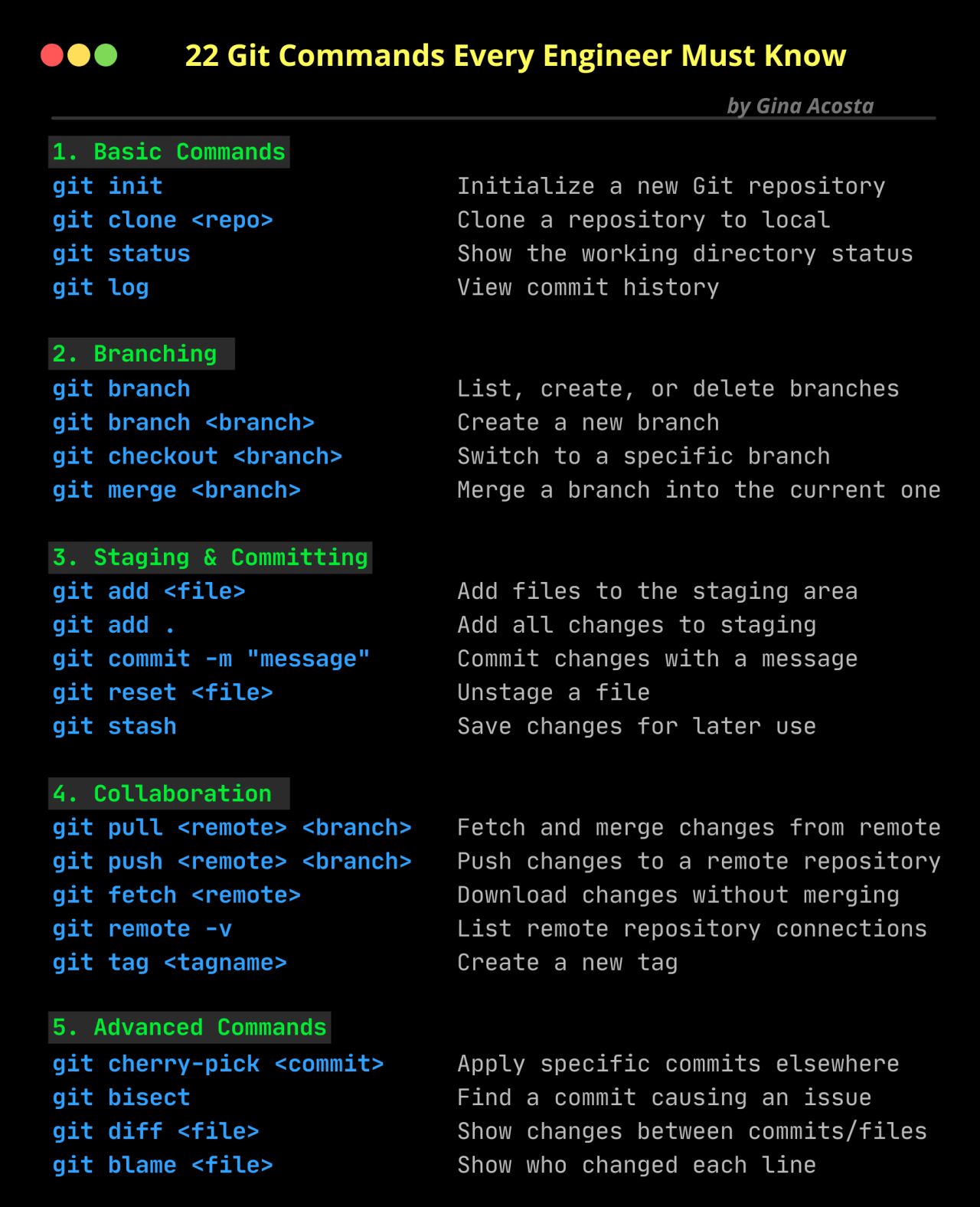](https://resources.planforfailure.com/uploads/images/gallery/2025-03/UMKYROHHYkGsTdSk-git.jpeg)
1. [Git commands](https://planforfailure.com/docs/gif/git_commands.gif)
2. 𝐑𝐞𝐩𝐨𝐬𝐢𝐭𝐨𝐫𝐲 𝐁𝐚𝐬𝐢𝐜𝐬:
- Clone a Repository:
Command:
git clone <repository\_url>
- Initialize a Repository:
Command:
git init
2. 𝐖𝐨𝐫𝐤𝐢𝐧𝐠 𝐰𝐢𝐭𝐡 𝐁𝐫𝐚𝐧𝐜𝐡𝐞𝐬:
- Create a New Branch:
Command:
git branch <branch\_name>
- Switch to a Branch:
Command:
git checkout <branch\_name>
- Create and Switch to a New Branch:
Command:
git checkout -b <new\_branch\_name>
- List Branches:
Command:
git branch
3. 𝐂𝐨𝐦𝐦𝐢𝐭𝐭𝐢𝐧𝐠 𝐂𝐡𝐚𝐧𝐠𝐞𝐬:
- Stage Changes:
Command:
git add <file\_name>
- Stage All Changes:
Command:
git add .
- Commit Changes:
Command:
git commit -m "Commit message"
4. 𝐏𝐮𝐥𝐥𝐢𝐧𝐠 𝐚𝐧𝐝 𝐏𝐮𝐬𝐡𝐢𝐧𝐠:
- Pull Changes from Remote:
Command:
git pull origin <branch\_name>
- Push Changes to Remote:
Command:
git push origin <branch\_name>
5. 𝐌𝐞𝐫𝐠𝐢𝐧𝐠 𝐂𝐡𝐚𝐧𝐠𝐞𝐬:
- Merge Branch into Current Branch:
Command:
git merge <branch\_name>
6. 𝐖𝐨𝐫𝐤𝐢𝐧𝐠 𝐰𝐢𝐭𝐡 𝐑𝐞𝐦𝐨𝐭𝐞𝐬:
- Add a Remote Repository:
Command:
git remote add <remote\_name> <repository\_url>
- List Remote Repositories:
Command:
git remote -v
7. 𝐇𝐚𝐧𝐝𝐥𝐢𝐧𝐠 𝐂𝐨𝐧𝐟𝐥𝐢𝐜𝐭𝐬:
- Check for Conflicts:
Command:
git diff
- Resolve Conflicts and Continue Merge:
Command:
git add <file\_name>
git merge --continue
8. 𝐆𝐢𝐭𝐇𝐮𝐛 𝐀𝐜𝐭𝐢𝐨𝐧𝐬:
- Workflow Syntax Checking:
Command:
git pull origin <branch\_name>
git push origin <branch\_name>
9. 𝐌𝐢𝐬𝐜𝐞𝐥𝐥𝐚𝐧𝐞𝐨𝐮𝐬:
- Check Git Status:
Command:
git status
- View Commit History:
Command:
git log
- Ignore Files (Add to `.gitignore`):
Command:
echo "<file\_name>" >> .gitignore
𝓒𝓸𝓶𝓶𝓾𝓷𝓲𝓽𝔂 𝓯𝓸𝓻 𝓹𝓻𝓸𝓯𝓮𝓼𝓼𝓲𝓸𝓷𝓪𝓵𝓼 : [https://www.thealpha.dev/](https://www.thealpha.dev/)
1.Core:
• git init
• git clone
• git add
• git commit
• git status
• git diff
• git checkout
• git reset
• git log
• git show
• git tag
• git push
• git pull
2.Branching:
• git branch
• git checkout -b
• git merge
• git rebase
• git branch --set-upstream-to
• git branch --unset-upstream
• git cherry-pick
3.Merging:
• git merge
• git rebase
4.Stashing:
• git stash
• git stash pop
• git stash list
• git stash apply
• git stash drop
5.Remotes:
• git remote
• git remote add
• git remote remove
• git fetch
• git pull
• git push
• git clone --mirror
6.Configuration:
• git config
• git global config
• git reset config
7\. Plumbing:
• git cat-file
• git checkout-index
• git commit-tree
• git diff-tree
• git for-each-ref
• git hash-object
• git ls-files
• git ls-remote
• git merge-tree
• git read-tree
• git rev-parse
• git show-branch
• git show-ref
• git symbolic-ref
• git tag --list
• git update-ref
8.Porcelain:
• git blame
• git bisect
• git checkout
• git commit
• git diff
• git fetch
• git grep
• git log
• git merge
• git push
• git rebase
• git reset
• git show
• git tag
9.Alias:
• git config --global alias.<alias> <command>
10.Hook:
• git config --local core.hooksPath <path>
11.Experimental: (May not be fully Supported)
• git annex
• git am
• git cherry-pick --upstream
• git describe
• git format-patch
• git fsck
• git gc
• git help
• git log --merges
• git log --oneline
• git log --pretty=
• git log --short-commit
• git log --stat
• git log --topo-order
• git merge-ours
• git merge-recursive
• git merge-subtree
• git mergetool
• git mktag
• git mv
• git patch-id
• git p4
• git prune
• git pull --rebase
• git push --mirror
• git push --tags
• git reflog
• git replace
• git reset --hard
• git reset --mixed
• git revert
• git rm
• git show-branch
• git show-ref
• git show-ref --heads
• git show-ref --tags
• git stash save
• git subtree
• git tag --delete
• git tag --force
• git tag --sign
• git tag -f
• git tag -l
• git tag --verify
• git unpack-file
• git update-index
• git verify-pack
• git worktree
\------------------- END ------------------
Some good resources to Learn Git faster ☺️
1.Git Official Documentation:
[https://git-scm.com/doc](https://git-scm.com/doc)
2.GitHub Learning Lab:
[https://rb.gy/ksc45f](https://rb.gy/ksc45f)
3.Codecademy Course
[https://lnkd.in/g-87iUdn](https://lnkd.in/g-87iUdn)
4\. Pro Git: by Scott Chacon \[Book\]
[https://lnkd.in/gecriC8P](https://lnkd.in/gecriC8P)
5\. YouTube
• FreeCodeCampOrg- beginer
[https://rb.gy/ljxt5s](https://rb.gy/ljxt5s)
• FreeCodeCampOrg- Intermediate
[https://rb.gy/1x6mc](https://rb.gy/1x6mc)
• Programming with mosh
[https://rb.gy/vfkom](https://rb.gy/vfkom)
# Docker Vs Podman Vs CRIO
[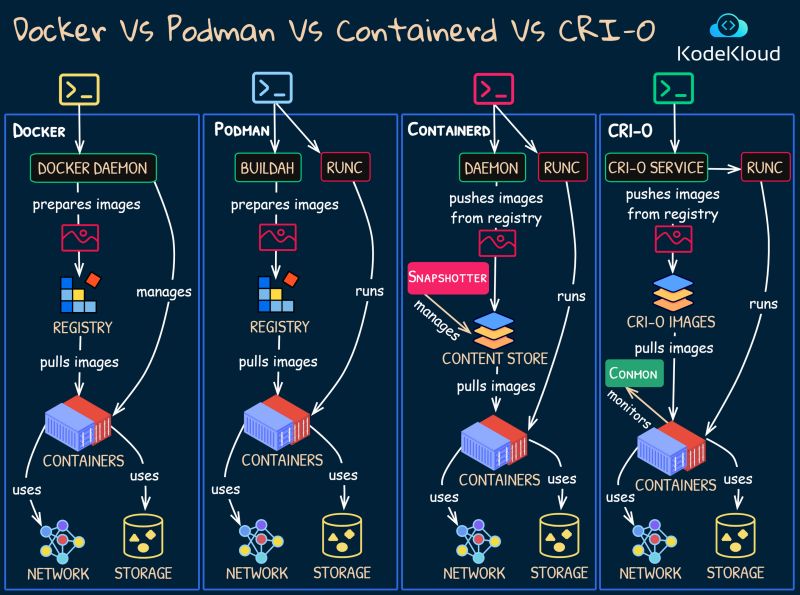](https://resources.planforfailure.com/uploads/images/gallery/2024-04/fPbn97MLHLaiDltq-docker-podman-crio.jpeg)
Docker:
A comprehensive platform that enables developers to build, share, and run containers with an easy-to-use CLI and a daemon-based architecture.
Podman:
A daemonless container engine for developing, managing, and running OCI Containers on your Linux System, with a CLI similar to Docker.
Containerd:
An industry-standard core container runtime, focused on simplicity and robustness, providing the minimum functionalities required to run containers and manage images on a system.
CRI-O:
A lightweight container runtime specifically designed for Kubernetes, providing an implementation of the Kubernetes Container Runtime Interface (CRI) to allow OCI compatible runtimes to be used in Kubernetes clusters.
# Terraform
1. Tutorials
🟣 Terraform Course – Automate your AWS cloud infrastructure
[https://lnkd.in/dvpzNT5M](https://lnkd.in/dvpzNT5M)
🟣 HashiCorp Terraform Associate Certification Course by Andrew Brown
[https://lnkd.in/dn5m2NKQ](https://lnkd.in/dn5m2NKQ)
🟣 Terraform for DevOps Beginners + Labs by KodeKloud
[https://lnkd.in/d8nkTj3n](https://lnkd.in/d8nkTj3n)
🟣 Terraform Foundations Course by Derek Morgan
[https://lnkd.in/dWYByZjH](https://lnkd.in/dWYByZjH)
🟣 HashiCorp Terraform Associate certification exam
[https://lnkd.in/dhV35bJG](https://lnkd.in/dhV35bJG)
🟣 Learn Terraform (and AWS) by Building a Dev Environment - Full Course for Beginners
[https://lnkd.in/dA44F\_\_P](https://lnkd.in/dA44F__P)
🟣 Complete Terraform Course - From BEGINNER to PRO! (Learn Infrastructure as Code)
[https://lnkd.in/dRs3YFu3](https://lnkd.in/dRs3YFu3)
🟣 Azure Terraform Full Course I Microsoft
Azure Terraform Course
[https://lnkd.in/dM-h-R8y](https://lnkd.in/dM-h-R8y)
20 best practices to improve your Terraform workflow
[https://spacelift.io/blog/terraform-best-practices](https://spacelift.io/blog/terraform-best-practices)
2\. Labs
🟣 Lab 1.Terraform Introduction | Terraform Tutorial for Beginners | Terraform for DevOps Engineer
[https://lnkd.in/dCpQyKNz](https://lnkd.in/dCpQyKNz)
🟣 Lab 2. How to Use Visual Studio code for Terraform | Creating EC2 Instance using Terraform
[https://lnkd.in/dvMC5a2J](https://lnkd.in/dvMC5a2J)
🟣 Lab 3. \[Scenario-1\]: How to Create VPC using Terraform | AWS VPC using Terraform | AWS Terraform
[https://lnkd.in/dtT3zMzF](https://lnkd.in/dtT3zMzF)
🟣 Lab 4. AWS NAT Gateway using Terraform | AWS Private Subnet using Terraform | Terraform Tutorial
[https://lnkd.in/dqTeZQdc](https://lnkd.in/dqTeZQdc)
🟣 Lab 5. Terraform Input Variables | How to Use Terraform Input Variables | Terraform Variables
[https://lnkd.in/dqsAKSyH](https://lnkd.in/dqsAKSyH)
🟣 Lab 6. Terraform Output Variables Example | Terraform Output Values | Terraform Outputs
[https://lnkd.in/dhkgFexc](https://lnkd.in/dhkgFexc)
🟣 Lab 7. Terraform Local Values | How to use Terraform Local Values | Terraform Locals
[https://lnkd.in/dHZEW\_sy](https://lnkd.in/dHZEW_sy)
🟣 Lab 8. How to Create EC2 Instance in AWS using Terraform | Create EC2 Instance using Terraform
[https://lnkd.in/dKjwzqGT](https://lnkd.in/dKjwzqGT)
🟣 Lab 9. AWS EC2 Instance,Security Group in AWS Using Terraform | Terraform Create Security Group AWS
[https://lnkd.in/dMA-J7GE](https://lnkd.in/dMA-J7GE)
# Monitoring
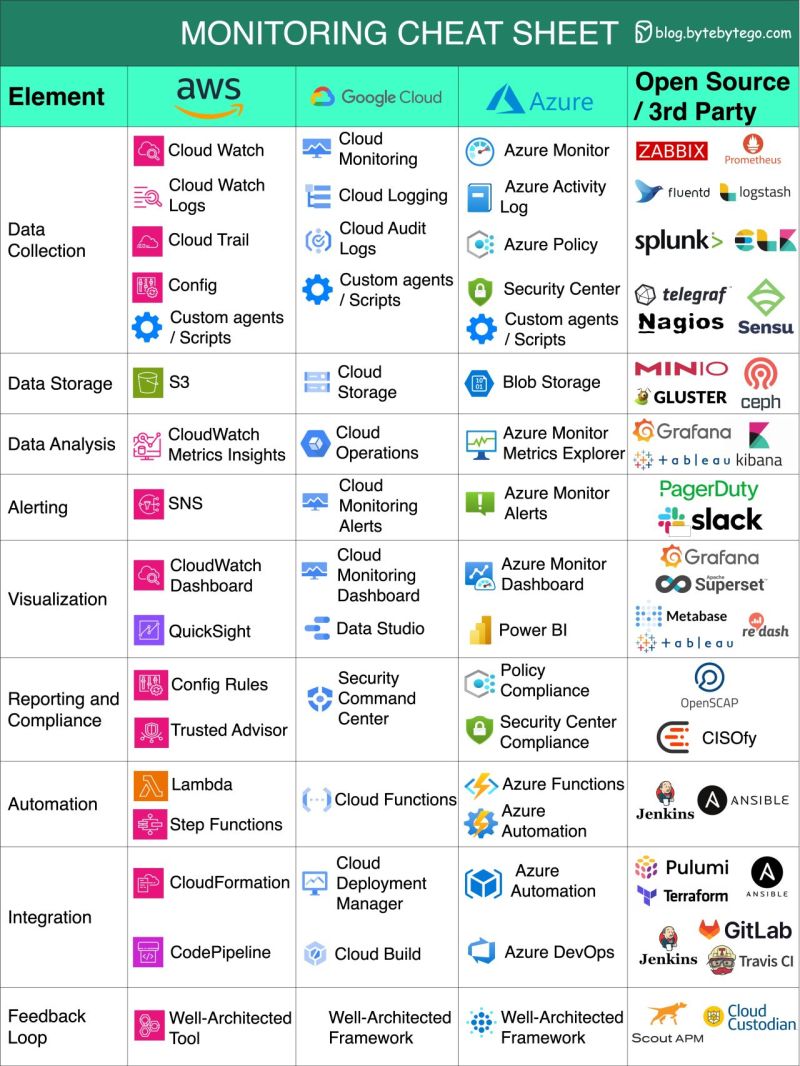
Cloud Monitoring
[](https://resources.planforfailure.com/uploads/images/gallery/2024-04/dJJh5P738IjjDLo2-monitoring-cs.jpeg)
# Kubernetes
Here are 13 of the most commonly used kubectl commands for managing a real production Kubernetes environment, along with explanations and common use cases:
✅ 𝐂𝐨𝐫𝐞 𝐌𝐚𝐧𝐚𝐠𝐞𝐦𝐞𝐧𝐭
\#1 𝐤𝐮𝐛𝐞𝐜𝐭𝐥 𝐠𝐞𝐭
→ kubectl get pods (list pods)
→ kubectl get deployments (list deployments)
→ kubectl get services (list services)
→ kubectl get all (list most resources in a namespace)
\#2 𝐤𝐮𝐛𝐞𝐜𝐭𝐥 𝐝𝐞𝐬𝐜𝐫𝐢𝐛𝐞
→ kubectl describe pod my-pod
→ kubectl describe node my-node
\#3 𝐤𝐮𝐛𝐞𝐜𝐭𝐥 𝐜𝐫𝐞𝐚𝐭𝐞
→ kubectl create -f my-deployment.yaml
\#4 𝐤𝐮𝐛𝐞𝐜𝐭𝐥 𝐚𝐩𝐩𝐥𝐲
→ kubectl apply -f my-deployment.yaml (apply a deployment definition)
\#5 𝐤𝐮𝐛𝐞𝐜𝐭𝐥 𝐝𝐞𝐥𝐞𝐭𝐞
→ kubectl delete pod my-pod
→ kubectl delete service my-service
✅ Debugging and Troubleshooting
\#6 𝐤𝐮𝐛𝐞𝐜𝐭𝐥 𝐥𝐨𝐠𝐬
→ kubectl logs my-pod
→ kubectl logs my-pod -c my-container (specify a container)
\#7 𝐤𝐮𝐛𝐞𝐜𝐭𝐥 𝐞𝐱𝐞𝐜
→ kubectl exec -it my-pod -- bash (interactive shell)
\#8 𝐤𝐮𝐛𝐞𝐜𝐭𝐥 𝐩𝐨𝐫𝐭-𝐟𝐨𝐫𝐰𝐚𝐫𝐝
→ kubectl port-forward my-pod 8080:80
\#9 𝐤𝐮𝐛𝐞𝐜𝐭𝐥 𝐭𝐨𝐩
→ kubectl top pod (pod resource usage)
→ kubectl top node (node resource usage)
\#10 𝐤𝐮𝐛𝐞𝐜𝐭𝐥 𝐞𝐱𝐩𝐥𝐚𝐢𝐧
→ kubectl explain pod
→ kubectl explain pod.spec (more specific)
✅ Managing Workloads
\#11 𝐤𝐮𝐛𝐞𝐜𝐭𝐥 𝐫𝐨𝐥𝐥𝐨𝐮𝐭
→ kubectl rollout status deployment/my-deployment
→ kubectl rollout undo deployment/my-deployment
\#12 𝐤𝐮𝐛𝐞𝐜𝐭𝐥 𝐬𝐜𝐚𝐥𝐞
→ kubectl scale deployment/my-deployment --replicas=5
\#13 𝐤𝐮𝐛𝐞𝐜𝐭𝐥 𝐞𝐝𝐢𝐭
→ kubectl edit deployment my-deployment
# Python for Devops
[https://www.youtube.com/playlist?list=PLdpzxOOAlwvKwTyYNJCUwGPvql0TrsPgv](https://www.youtube.com/playlist?list=PLdpzxOOAlwvKwTyYNJCUwGPvql0TrsPgv)
This guide is designed specifically for our niche, will break it down for you. Supplemental [Python for Devops Course Guide](https://planforfailure.com/docs/python_for_devops.pdf)
Topics covered:
• Python Fundamentals & Data Types
• Functions, Modules and Packages
• Environment Variables & CLI Arguments
• Conditional Handling & Loops
• File Operations
• Boto3
• GitHub Webhook
• Jira with GitHub Actions
• DevOps Interview Questions
[https://media.licdn.com/dms/document/media/v2/D4D1FAQFESznfix7oTA/feedshare-document-pdf-analyzed/B4DZTG9B7ZHAAY-/0/1738504690708?e=1740009600&v=beta&t=jbPu5CTYw\_TZW0e6pUt3g1eKBWRS3B6Ec8aLg2Lt14I](https://media.licdn.com/dms/document/media/v2/D4D1FAQFESznfix7oTA/feedshare-document-pdf-analyzed/B4DZTG9B7ZHAAY-/0/1738504690708?e=1740009600&v=beta&t=jbPu5CTYw_TZW0e6pUt3g1eKBWRS3B6Ec8aLg2Lt14I)
# Devops Roadmap 2025
[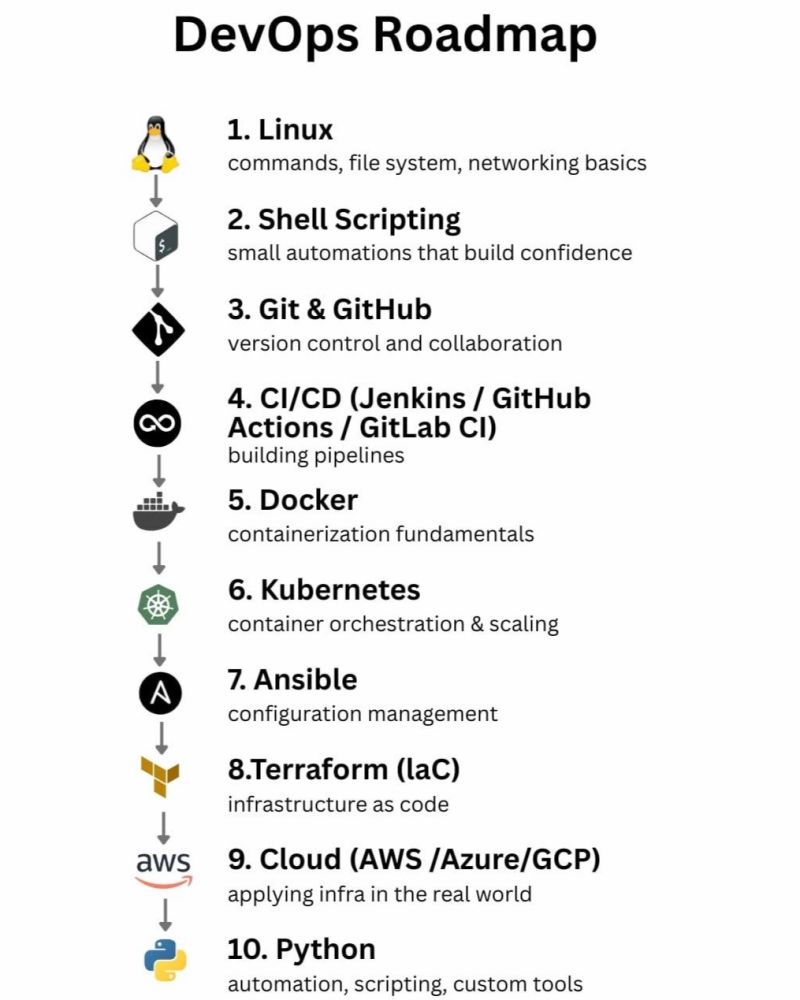](https://resources.planforfailure.com/uploads/images/gallery/2025-10/PzKURhg8rFDdLqNm-devops-roadmap.jpeg)📚 Complete DevOps Roadmap 2025 - Master these 4 Levels!
[https://lnkd.in/dBh\_Yi69](https://www.youtube.com/watch?v=1J2YOV6LcwY)
📚 What is DevOps? REALLY understand it | DevOps vs SRE
[https://lnkd.in/d836Ss8w](https://www.youtube.com/watch?v=0yWAtQ6wYNM&list=PLy7NrYWoggjwV7qC4kmgbgtFBsqkrsefG)
📚 Docker Tutorial for Beginners \[FULL COURSE in 3 Hours\]
[https://lnkd.in/dpd-9bSN](https://www.youtube.com/watch?v=3c-iBn73dDE)
📚 Kubernetes Tutorial for Beginners \[FULL COURSE in 4 Hours\]
[https://lnkd.in/dN3NG4-5](https://www.youtube.com/watch?v=X48VuDVv0do)
📚 Golang Tutorial for Beginners | Full Go Course
[https://lnkd.in/dRQWUg-Q](https://www.youtube.com/watch?v=yyUHQIec83I)
📚 Python Tutorial for Beginners - Learn Python in 5 Hours \[FULL COURSE\]
[https://lnkd.in/d8jN\_yJK](https://www.youtube.com/watch?v=t8pPdKYpowI)
📚 Terraform explained in 15 mins | Terraform Tutorial for Beginners
[https://lnkd.in/dtQxm9yR](https://www.youtube.com/watch?v=l5k1ai_GBDE)
📚 GitHub Actions Tutorial - Basic Concepts and CI/CD Pipeline with Docker
[https://lnkd.in/dtQxm9yR](https://www.youtube.com/watch?v=l5k1ai_GBDE)
📚 Azure DevOps Tutorial for Beginners | CI/CD with Azure Pipelines
[https://lnkd.in/d\_5ii\_cK](https://www.youtube.com/watch?v=4BibQ69MD8c)
📚 GitLab CI CD Tutorial for Beginners \[Crash Course\]
[https://lnkd.in/dqUZUiRy](https://www.youtube.com/watch?v=qP8kir2GUgo)
📚 How Prometheus Monitoring works | Prometheus Architecture explained
[https://lnkd.in/d4BUF\_UV](https://www.youtube.com/watch?v=h4Sl21AKiDg)
📚 Ultimate Docker Compose Tutorial
[https://lnkd.in/d-MyfQ7N](https://www.youtube.com/watch?v=SXwC9fSwct8)
📚 HashiCorp Vault Tutorial for Beginners - What, Why and How
[https://lnkd.in/d\_w8yGnX](https://www.youtube.com/watch?v=klyAhaklGNU)
📚 Full NGINX Tutorial - Demo Project with Node.js, Docker
[https://lnkd.in/d-eNKDhV](https://www.youtube.com/watch?v=q8OleYuqntY)
📚 ArgoCD Tutorial for Beginners | GitOps CD for Kubernetes
[https://lnkd.in/dbnUManC](https://www.youtube.com/watch?v=MeU5_k9ssrs)
📚 Proxy vs Reverse Proxy vs Load Balancer | Simply Explained
[https://lnkd.in/dUeWPMmH](https://www.youtube.com/watch?v=xo5V9g9joFs)
📚 What is Ansible | Ansible Playbook explained | Ansible Tutorial for Beginners
[https://lnkd.in/dVSkkwCn](https://www.youtube.com/watch?v=1id6ERvfozo&list=PLy7NrYWoggjzmPAyfDQgthSgx6VEVlS0-)
📚 What is Infrastructure as Code? Difference of Infrastructure as Code Tools
[https://lnkd.in/dEQAQJtF](https://www.youtube.com/watch?v=POPP2WTJ8es&list=PLy7NrYWoggjzmPAyfDQgthSgx6VEVlS0-&index=4)
📚 What is GitOps, How GitOps works and Why it's so useful
[https://lnkd.in/ddXkthWb](https://www.youtube.com/watch?v=f5EpcWp0THw&list=PLy7NrYWoggjzmPAyfDQgthSgx6VEVlS0-&index=7)
# Linux Perf
[](https://resources.planforfailure.com/uploads/images/gallery/2025-10/OWPR78x6XVAYTKYj-linux-perf-tools-full.png)